
Article Categories
- All Categories
-
 Data Structure
-
 Networking
-
 RDBMS
RDBMS
-
 Operating System
-
 Java
Java
-
 MS Excel
-
 iOS
iOS
-
 HTML
HTML
-
 CSS
CSS
-
 Android
-
 Python
-
 C Programming
-
 C++
C++
-
 C#
C#
-
 MongoDB
-
 MySQL
MySQL
-
 Javascript
-
 PHP
PHP
-
 Economics & Finance
Selected Reading
How to generate random colors in Matplotlib?
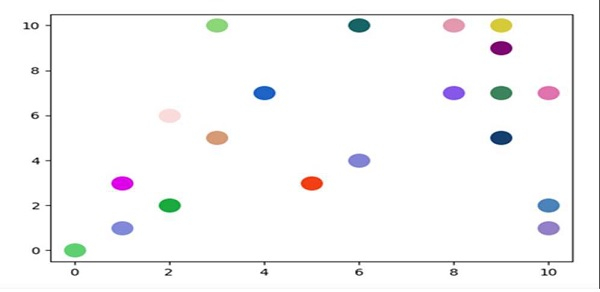
To make a custom color, we can create a hexadecimal string. From it, we can make different sets of color representation and can pass into the scatter method to get the desired output.
Steps
Take an input from the user for the number of colors, i.e., number_of_colors = 20.
Use Hexadecimal alphabets to get a color.
Create a color from (step 2) by choosing a random character from step 2 data.
Plot scatter points for step 1 input data, with step 3 colors.
To show the figure, use plt.show() method.
Example
import matplotlib.pyplot as plt
import random

number_of_colors = int(input("Please enter number of colors: "))

hexadecimal_alphabets = '0123456789ABCDEF'

color = ["#" + ''.join([random.choice(hexadecimal_alphabets) for j in
range(6)]) for i in range(number_of_colors)]

for i in range(number_of_colors):
   plt.scatter(random.randint(0, 10), random.randint(0, 10), c=color[i], s=200)

plt.show()
Output
Please enter the number of colors: 20

Updated on: 2021-03-16T10:21:32+05:30
3K+ Views

Advertisements