
Article Categories
- All Categories
-
 Data Structure
-
 Networking
-
 RDBMS
RDBMS
-
 Operating System
-
 Java
Java
-
 MS Excel
-
 iOS
iOS
-
 HTML
HTML
-
 CSS
CSS
-
 Android
-
 Python
-
 C Programming
-
 C++
C++
-
 C#
C#
-
 MongoDB
-
 MySQL
MySQL
-
 Javascript
-
 PHP
PHP
-
 Economics & Finance
Selected Reading
How to find MySQL my.cnf on my windows computer?
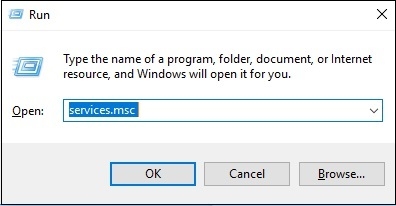
To find my.cnf on Windows system, first open the command prompt with the help of shortcut key Windows + R (run). The snapshot is as follows −

Type “services.msc” on command prompt and press ENTER as shown in the following screenshot −
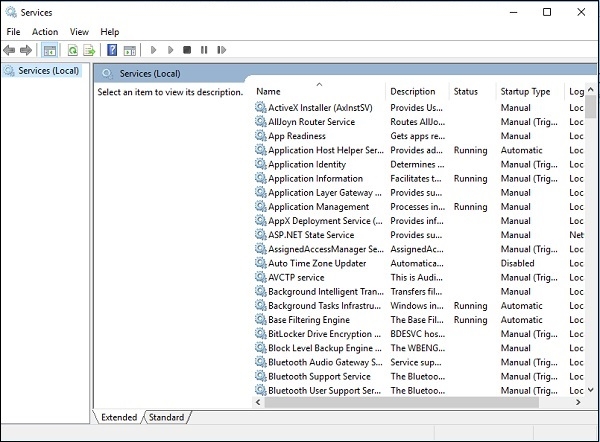
Now, a new wizard will open. The snapshot is as follows −
Now, search for MySQL. The snapshot is as follows −
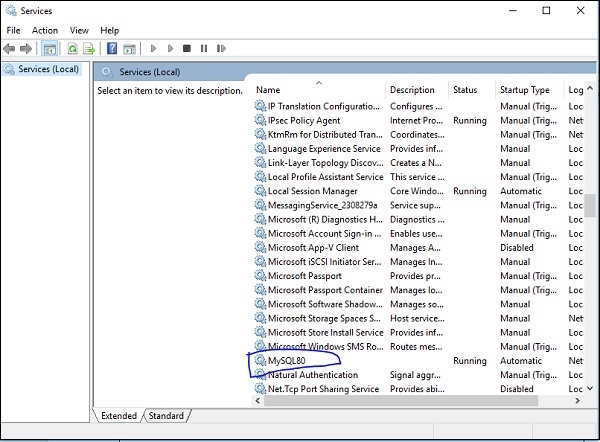
Right click on “MySQL80” and select “Properties” as in the following screenshot −
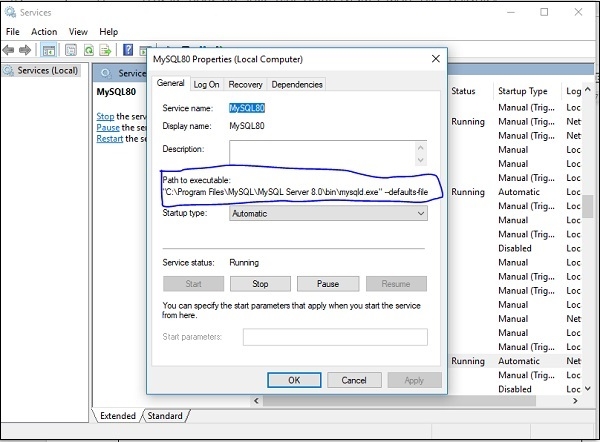
As you can see in the above screenshot, “Path to executable” tells about the location of my.cnf on Windows.

Updated on: 2019-07-30T22:30:24+05:30
3K+ Views

Advertisements