
Article Categories
- All Categories
-
 Data Structure
-
 Networking
-
 RDBMS
RDBMS
-
 Operating System
-
 Java
Java
-
 MS Excel
-
 iOS
iOS
-
 HTML
HTML
-
 CSS
CSS
-
 Android
-
 Python
-
 C Programming
-
 C++
C++
-
 C#
C#
-
 MongoDB
-
 MySQL
MySQL
-
 Javascript
-
 PHP
PHP
-
 Economics & Finance
Selected Reading
How to display "No records available" text in a JTable in Java?
A JTable is a subclass of JComponent class and it can be used to create a table with information displayed in multiple rows and columns. When a value is selected from a JTable, a TableModelEvent is generated, which is handled by implementing a TableModelListener interface.
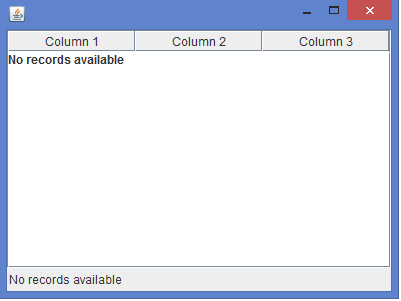
In the below program, we can display "No records available" text if the rows are not available in a JTable.
Example
import java.awt.*;
import java.awt.event.*;
import javax.swing.*;
import javax.swing.table.*;
public class NoRecordTableTest extends JFrame {
   private JPanel panel;
   private JTable table;
   private JScrollPane scrollPane;
   public NoRecordTableTest() {
      panel = new JPanel();
      panel.setLayout(new BorderLayout());
      String columnNames[] = {"Column 1", "Column 2", "Column 3"};
      String dataValues[][] = {};
      table = new JTable(dataValues, columnNames);
      JLabel label = new JLabel("No records available");
      label.setSize(label.getPreferredSize());
      table.add(label);
      table.setFillsViewportHeight(true);
      scrollPane = new JScrollPane(table);
      panel.add(scrollPane, BorderLayout.CENTER);
      panel.add(new Label("No records available"), BorderLayout.SOUTH);
      add(panel);
      setSize(400, 300);
      setDefaultCloseOperation(JFrame.EXIT_ON_CLOSE);
      setLocationRelativeTo(null);
      setVisible(true);
   }
   public static void main( String args[] ) {
      new NoRecordTableTest();
   }
}
Output

Updated on: 2020-02-12T07:15:04+05:30
649 Views

Advertisements