
Article Categories
- All Categories
-
 Data Structure
-
 Networking
-
 RDBMS
RDBMS
-
 Operating System
-
 Java
Java
-
 MS Excel
-
 iOS
iOS
-
 HTML
HTML
-
 CSS
CSS
-
 Android
-
 Python
-
 C Programming
-
 C++
C++
-
 C#
C#
-
 MongoDB
-
 MySQL
MySQL
-
 Javascript
-
 PHP
PHP
-
 Economics & Finance
Selected Reading
How to delete the Organizational Unit (OU) from the active directory using PowerShell?
To delete the OU from the Active Directory using PowerShell, we need to use the command Remove-ADOrganizationUnit
Remove-ADOrganizationalUnit -Identity "OU=LabUsers,DC=Labdomain,DC=Local"
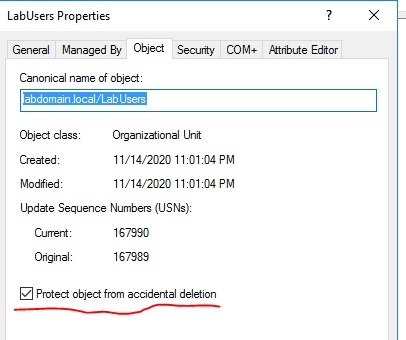
If the OU is protected from the accidental delete, you will receive an Access is Denied error as shown below.
Remove-ADOrganizationalUnit : Access is denied At line:1 char:1 + Remove-ADOrganizationalUnit -Identity "OU=LabUsers,DC=Labdomain,DC=Lo ...
+ ~~~~~~~~~~~~~~~~~~~~~~~~~~~~~~~~~~~~~~~~~~~~~~~~~~~~~~~~~~~~~~~~~~~~~ + CategoryInfo : PermissionDenied: (OU=LabUsers,DC=Labdomain,DC=Local:ADOrganizationalUnit) [Remove-ADOrgan izationalUnit], UnauthorizedAccessException + FullyQualifiedErrorId : ActiveDirectoryCmdlet:System.UnauthorizedAccessException,Microsoft.ActiveDirectory.Managem
ent.Commands.RemoveADOrganizationalUnit
So for that, first you need to disable the protected mode using the Set-ADOrganizationalUnit command and then need to run the remove command as shown below.
$ou = "OU=LabUsers,DC=Labdomain,DC=Local" Set-ADOrganizationalUnit -Identity $ou -ProtectedFromAccidentalDeletion $false Remove-ADOrganizationalUnit -Identity $ou -Confirm:$false -Verbose
You need to make sure that there are no child objects that exist otherwise, OU won’t get deleted.

Updated on: 2020-11-20T08:48:05+05:30
1K+ Views

Advertisements