
Article Categories
- All Categories
-
 Data Structure
-
 Networking
-
 RDBMS
RDBMS
-
 Operating System
-
 Java
Java
-
 MS Excel
-
 iOS
iOS
-
 HTML
HTML
-
 CSS
CSS
-
 Android
-
 Python
-
 C Programming
-
 C++
C++
-
 C#
C#
-
 MongoDB
-
 MySQL
MySQL
-
 Javascript
-
 PHP
PHP
-
 Economics & Finance
Selected Reading
How to deal with ModalDialog using selenium webdriver?
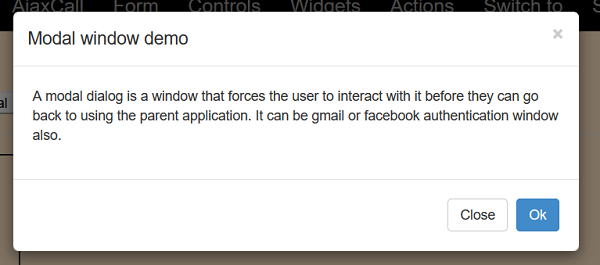
We can deal with modal dialog boxes with Selenium. A modal is just like a window that enforces the user to access it prior to going back to the actual page. It can be an authentication window as well.
Let us work with the below modal dialog −
Example
import org.openqa.selenium.By;
import org.openqa.selenium.WebDriver;
import org.openqa.selenium.WebElement;
import org.openqa.selenium.chrome.ChromeDriver;
public class ModDialog{
   public static void main(String[] args) {
      System.setProperty("webdriver.chrome.driver","C:\Users\ghs6kor\Desktop\Java\chromedriver.exe");
      WebDriver driver = new ChromeDriver();
      driver.get("http://www.uitestpractice.com/Students/Switchto");
      // identify element and click
      WebElement m = driver
      .findElement(By.xpath("//button[contains(text(), 'Launch modal')]"));
      // identify modal header and obtain text
      WebElement m=
      driver.findElement(By.xpath("//h4[@class='modal−title']"));
      System.out.println("Modal Dialog text: " + m.getText());
      // click on OK
      WebElement n= driver.findElement(By.xpath("//button[text()='Ok']"));
      n.click();
      driver.quit();
   }
}
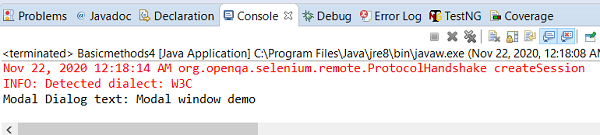
Output

Updated on: 2020-11-28T13:46:45+05:30
5K+ Views

Advertisements