
Article Categories
- All Categories
-
 Data Structure
-
 Networking
-
 RDBMS
RDBMS
-
 Operating System
-
 Java
Java
-
 MS Excel
-
 iOS
iOS
-
 HTML
HTML
-
 CSS
CSS
-
 Android
-
 Python
-
 C Programming
-
 C++
C++
-
 C#
C#
-
 MongoDB
-
 MySQL
MySQL
-
 Javascript
-
 PHP
PHP
-
 Economics & Finance
How to create a semi-transparent background in Canva?
If you are someone who wants your text to not get overwhelmed by the background, then a semi-transparent background maybe a good option for you. So, here is a guide to help to set a semi-transparent background to your design.
Creating a Semi-transparent Background in Canva
This feature is most effective to use when you want to increase the transparency of the background of a template you have designed. It gives your design a clarity and also makes sure the audience focuses solely on the contents of the design.
To implement this, follow the steps given below −
Select the design you want to add a transparent background to.
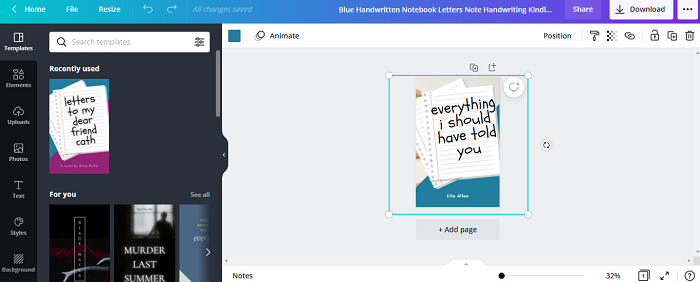
Select the background image of your template.
Select the Transparency tool located on the toolbar above the work screen.
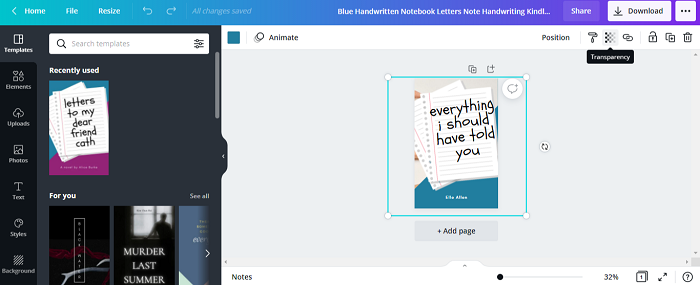
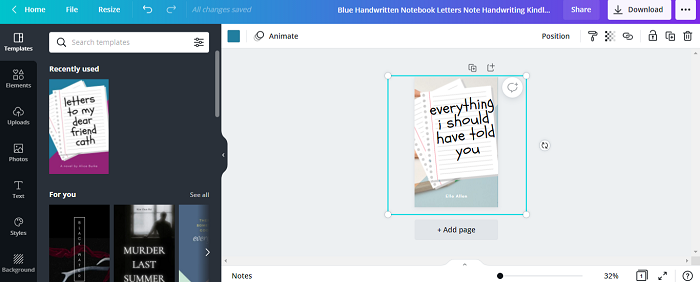
On selecting the icon, a small slider appears. Adjust the slider according to how transparent you want your template background to be.
Your template with transparent background is ready.

2K+ Views
