
Article Categories
- All Categories
-
 Data Structure
-
 Networking
-
 RDBMS
RDBMS
-
 Operating System
-
 Java
Java
-
 MS Excel
-
 iOS
iOS
-
 HTML
HTML
-
 CSS
CSS
-
 Android
-
 Python
-
 C Programming
-
 C++
C++
-
 C#
C#
-
 MongoDB
-
 MySQL
MySQL
-
 Javascript
-
 PHP
PHP
-
 Economics & Finance
Selected Reading
How to count the number of rows in a table in Selenium with python?
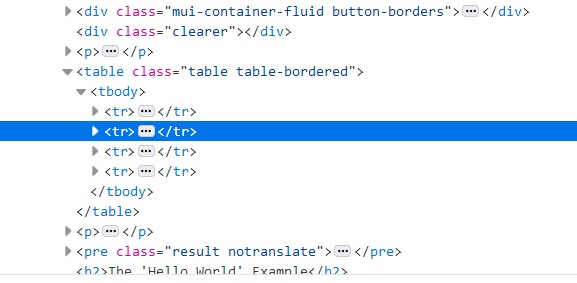
We can count the total number of rows in a table in Selenium. The rows of a table are represented by
The html code snippet of a table row count is as described below −
Syntax
driver.find_elements_by_xpath("//table/tbody/tr")
Example
Code Implementation for getting row count.
from selenium import webdriver
#browser exposes an executable file
#Through Selenium test we will invoke the executable file which will then
#invoke actual browser
driver = webdriver.Chrome(executable_path="C:\chromedriver.exe")
# to maximize the browser window
driver.maximize_window()
#get method to launch the URL
driver.get("https://www.tutorialspoint.com/plsql/plsql_basic_syntax.htm")
#to refresh the browser
driver.refresh()
# identifying the number of rows having <tr> tag
rows = driver.find_elements_by_xpath("//table/tbody/tr")
# len method is used to get the size of that list
print(len(rows))
#to close the browser
driver.close()

Updated on: 2020-07-29T10:21:15+05:30
13K+ Views

Advertisements