
Article Categories
- All Categories
-
 Data Structure
-
 Networking
-
 RDBMS
RDBMS
-
 Operating System
-
 Java
Java
-
 MS Excel
-
 iOS
iOS
-
 HTML
HTML
-
 CSS
CSS
-
 Android
-
 Python
-
 C Programming
-
 C++
C++
-
 C#
C#
-
 MongoDB
-
 MySQL
MySQL
-
 Javascript
-
 PHP
PHP
-
 Economics & Finance
Selected Reading
How to change the title bar in Tkinter?
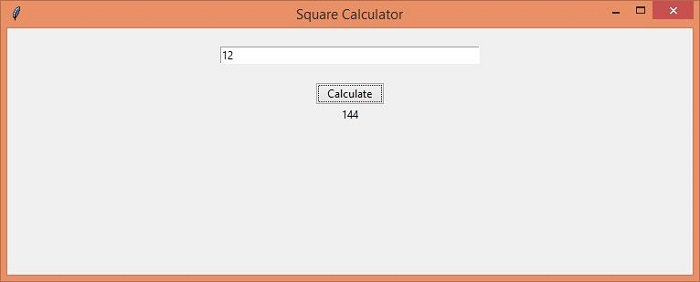
Tkinter initially sets a default title bar for every application. We can update or replace the Title Bar of the Tkinter application by configuring the title("Enter any Title") method. For a particular application, let us see how we can change the title of a Tkinter application that calculates the square of a number.
Example
#Import the required Libraries
from tkinter import *
from tkinter import ttk
import math

#Create an instance of Tkinter frame
win = Tk()

#Set the geometry of tkinter frame
win.geometry("750x270")

#Set the Title of Tkinter window
win.title("Square Calculator")

def find_square():
   no= int(entry.get())
   Label(win, text=no*no).pack()

#Create an entry widget to accept user input
entry= Entry(win, width=40)
entry.pack(ipadx= 20,pady=20)

#Create a button to calculate the number
ttk.Button(win, text= "Calculate", command= find_square).pack()
win.mainloop()
Output
The above program calculates the square of the given number in the Entry widget. Thus, the program window Title has been renamed to "Square Calculator".

Updated on: 2021-05-04T14:27:13+05:30
22K+ Views

Advertisements