
Article Categories
- All Categories
-
 Data Structure
-
 Networking
-
 RDBMS
RDBMS
-
 Operating System
-
 Java
Java
-
 MS Excel
-
 iOS
iOS
-
 HTML
HTML
-
 CSS
CSS
-
 Android
-
 Python
-
 C Programming
-
 C++
C++
-
 C#
C#
-
 MongoDB
-
 MySQL
MySQL
-
 Javascript
-
 PHP
PHP
-
 Economics & Finance
Selected Reading
How to change the size of the Console using PowerShell?
You can change the size of the PowerShell Console with GUI and CLI both.
With GUI −
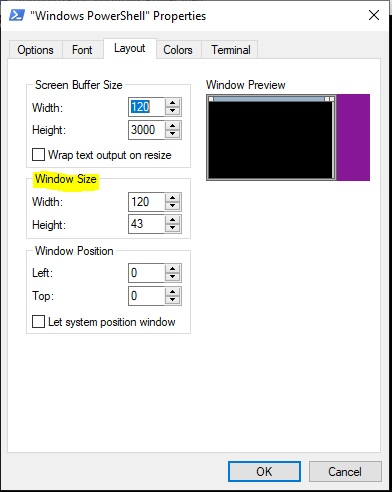
With CLI −
To change the Width of the console,
$host.UI.RawUI.WindowSize.Width = 150
To change the Height of the console,
$host.UI.RawUI.WindowSize.Height = 60

Updated on: 2020-01-23T08:05:01+05:30
2K+ Views

Advertisements