
Article Categories
- All Categories
-
 Data Structure
-
 Networking
-
 RDBMS
RDBMS
-
 Operating System
-
 Java
Java
-
 MS Excel
-
 iOS
iOS
-
 HTML
HTML
-
 CSS
CSS
-
 Android
-
 Python
-
 C Programming
-
 C++
C++
-
 C#
C#
-
 MongoDB
-
 MySQL
MySQL
-
 Javascript
-
 PHP
PHP
-
 Economics & Finance
Selected Reading
How to automatically resize a JTree in Java
To automatically resize a JTree, use the setVisibleRowCount() method in Java. At first, create a node in the tree −
DefaultMutableTreeNode node = new DefaultMutableTreeNode("Project");
Now, add nodes to the node created above −
DefaultMutableTreeNode node1 = new DefaultMutableTreeNode("App");
DefaultMutableTreeNode node2 = new DefaultMutableTreeNode("Website");
DefaultMutableTreeNode node3 = new DefaultMutableTreeNode("WebApp");
node.add(node1);
node.add(node2);
node.add(node3);
Now, create more nodes and set them as child nodes for the nodes we creted above −
DefaultMutableTreeNode one = new DefaultMutableTreeNode("Learning website");
DefaultMutableTreeNode two = new DefaultMutableTreeNode("Business website");
DefaultMutableTreeNode three = new DefaultMutableTreeNode("News publishing website");
DefaultMutableTreeNode four = new DefaultMutableTreeNode("Android app");
DefaultMutableTreeNode five = new DefaultMutableTreeNode("iOS app");
DefaultMutableTreeNode six = new DefaultMutableTreeNode("Editor WebApp");
node1.add(one);
node1.add(two);
node1.add(three);
node2.add(four);
node2.add(five);
node3.add(six);
Now, create a JTree and set the root node in it −
JTree tree = new JTree(node);
The following will display the scrollbane and only allow 8 rows to be visible −
tree.setVisibleRowCount(8);
JOptionPane.showMessageDialog(null, new JScrollPane(tree));
The following is an example to automatically resize a JTree −
Example
package my;
import javax.swing.JFrame;
import javax.swing.JOptionPane;
import javax.swing.JScrollPane;
import javax.swing.JTree;
import javax.swing.tree.DefaultMutableTreeNode;
public class SwingDemo {
   public static void main(String[] args) throws Exception {
      JFrame frame = new JFrame("Demo");
      DefaultMutableTreeNode node = new DefaultMutableTreeNode("Project");
      DefaultMutableTreeNode node1 = new DefaultMutableTreeNode("App");
      DefaultMutableTreeNode node2 = new DefaultMutableTreeNode("Website");
      DefaultMutableTreeNode node3 = new DefaultMutableTreeNode("WebApp");
      node.add(node1);
      node.add(node2);
      node.add(node3);
      DefaultMutableTreeNode one = new DefaultMutableTreeNode("Learning website");
      DefaultMutableTreeNode two = new DefaultMutableTreeNode("Business website");
      DefaultMutableTreeNode three = new DefaultMutableTreeNode("News publishing website");
      DefaultMutableTreeNode four = new DefaultMutableTreeNode("Android app");
      DefaultMutableTreeNode five = new DefaultMutableTreeNode("iOS app");
      DefaultMutableTreeNode six = new DefaultMutableTreeNode("Editor WebApp");
      node1.add(one);
      node1.add(two);
      node1.add(three);
      node2.add(four);
      node2.add(five);
      node3.add(six);
      JTree tree = new JTree(node);
      frame.add(tree);
      tree.setVisibleRowCount(8);
      JOptionPane.showMessageDialog(null, new JScrollPane(tree));
   }
}
Output
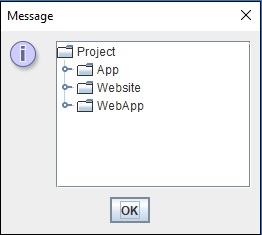
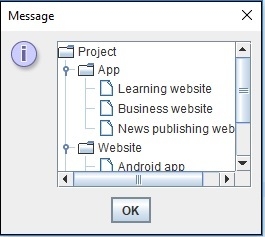
Now, when you will click on each node, then the sub-nodes will get displayed.. On extending the visible row count, a ScrollBar would be visible to resize the TREE −

Updated on: 2019-07-30T22:30:26+05:30
558 Views

Advertisements