
Article Categories
- All Categories
-
 Data Structure
-
 Networking
-
 RDBMS
RDBMS
-
 Operating System
-
 Java
Java
-
 MS Excel
-
 iOS
iOS
-
 HTML
HTML
-
 CSS
CSS
-
 Android
-
 Python
-
 C Programming
-
 C++
C++
-
 C#
C#
-
 MongoDB
-
 MySQL
MySQL
-
 Javascript
-
 PHP
PHP
-
 Economics & Finance
Selected Reading
How to align multiple buttons with different height in Java?
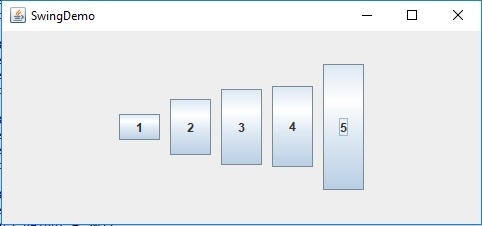
To align multiple buttons with different height in Java, try the following example, Here, we have set 5 buttons with GridBagConstraints −
GridBagConstraints constraints = new GridBagConstraints();
constraints.insets = new Insets(5, 5, 5, 5);
constraints.anchor = GridBagConstraints.WEST;
In addition, to set different height for different buttons, we have used −
component. getPreferredSize().height
The following is an example to align multiple buttons with different height −
Example
<span class="kwd">package</span><span class="pln"> </span><span class="kwd">my</span><span class="pun">;</span>
<span class="kwd">import</span><span class="pln"> java</span><span class="pun">.</span><span class="pln">awt</span><span class="pun">.</span><span class="typ">Dimension</span><span class="pun">;</span>
<span class="kwd">import</span><span class="pln"> java</span><span class="pun">.</span><span class="pln">awt</span><span class="pun">.</span><span class="typ">GridBagConstraints</span><span class="pun">;</span>
<span class="kwd">import</span><span class="pln"> java</span><span class="pun">.</span><span class="pln">awt</span><span class="pun">.</span><span class="typ">GridBagLayout</span><span class="pun">;</span>
<span class="kwd">import</span><span class="pln"> java</span><span class="pun">.</span><span class="pln">awt</span><span class="pun">.</span><span class="typ">Insets</span><span class="pun">;</span>
<span class="kwd">import</span><span class="pln"> javax</span><span class="pun">.</span><span class="pln">swing</span><span class="pun">.</span><span class="typ">JButton</span><span class="pun">;</span>
<span class="kwd">import</span><span class="pln"> javax</span><span class="pun">.</span><span class="pln">swing</span><span class="pun">.</span><span class="typ">JFrame</span><span class="pun">;</span>
<span class="kwd">import</span><span class="pln"> javax</span><span class="pun">.</span><span class="pln">swing</span><span class="pun">.</span><span class="typ">JPanel</span><span class="pun">;</span>
<span class="kwd">public</span><span class="pln"> </span><span class="kwd">class</span><span class="pln"> </span><span class="typ">SwingDemo </span><span class="pun">{</span>
<span class="kwd">   public</span><span class="pln"> </span><span class="kwd">static</span><span class="pln"> </span><span class="kwd">void</span><span class="pln"> main</span><span class="pun">(</span><span class="typ">String</span><span class="pun">[]</span><span class="pln"> args</span><span class="pun">)</span><span class="pln"> </span><span class="pun">{</span>
<span class="kwd">      final</span><span class="pln"> </span><span class="typ">JFrame</span><span class="pln"> frame </span><span class="pun">=</span><span class="pln"> </span><span class="kwd">new</span><span class="pln"> </span><span class="typ">JFrame</span><span class="pun">(</span><span class="typ">SwingDemo</span><span class="pun">.</span><span class="kwd">class</span><span class="pun">.</span><span class="pln">getSimpleName</span><span class="pun">());</span>
<span class="pln">      frame</span><span class="pun">.</span><span class="pln">setDefaultCloseOperation</span><span class="pun">(</span><span class="typ">JFrame</span><span class="pun">.</span><span class="pln">EXIT_ON_CLOSE</span><span class="pun">);</span>
<span class="typ">      JPanel</span><span class="pln"> panel </span><span class="pun">=</span><span class="pln"> </span><span class="kwd">new</span><span class="pln"> </span><span class="typ">JPanel</span><span class="pun">(</span><span class="kwd">new</span><span class="pln"> </span><span class="typ">GridBagLayout</span><span class="pun">());</span>
<span class="typ">      GridBagConstraints</span><span class="pln"> constraints </span><span class="pun">=</span><span class="pln"> </span><span class="kwd">new</span><span class="pln"> </span><span class="typ">GridBagConstraints</span><span class="pun">();</span>
<span class="pln">      constraints</span><span class="pun">.</span><span class="pln">insets </span><span class="pun">=</span><span class="pln"> </span><span class="kwd">new</span><span class="pln"> </span><span class="typ">Insets</span><span class="pun">(</span><span class="lit">5</span><span class="pun">,</span><span class="pln"> </span><span class="lit">5</span><span class="pun">,</span><span class="pln"> </span><span class="lit">5</span><span class="pun">,</span><span class="pln"> </span><span class="lit">5</span><span class="pun">);</span>
<span class="pln">      constraints</span><span class="pun">.</span><span class="pln">anchor </span><span class="pun">=</span><span class="pln"> </span><span class="typ">GridBagConstraints</span><span class="pun">.</span><span class="pln">WEST</span><span class="pun">;</span>
<span class="typ">      JButton</span><span class="pln"> btn1 </span><span class="pun">=</span><span class="pln"> </span><span class="kwd">new</span><span class="pln"> </span><span class="typ">JButton</span><span class="pun">(</span><span class="str">"1"</span><span class="pun">);</span>
<span class="pln">      panel</span><span class="pun">.</span><span class="kwd">add</span><span class="pun">(</span><span class="pln">btn1</span><span class="pun">,</span><span class="pln"> constraints</span><span class="pun">);</span>
<span class="typ">      JButton</span><span class="pln"> btn2 </span><span class="pun">=</span><span class="pln"> </span><span class="kwd">new</span><span class="pln"> </span><span class="typ">JButton</span><span class="pun">(</span><span class="str">"2"</span><span class="pun">);</span>
<span class="pln">      btn2</span><span class="pun">.</span><span class="pln">setPreferredSize</span><span class="pun">(</span><span class="kwd">new</span><span class="pln"> </span><span class="typ">Dimension</span><span class="pun">(</span><span class="pln">btn1</span><span class="pun">.</span><span class="pln">getPreferredSize</span><span class="pun">().</span><span class="pln">width</span><span class="pun">,</span><span class="pln"> btn1 </span><span class="pun">.</span><span class="pln">getPreferredSize</span><span class="pun">().</span><span class="pln">height </span><span class="pun">+</span><span class="pln"> </span><span class="lit">30</span><span class="pun">));</span>
<span class="pln">      panel</span><span class="pun">.</span><span class="kwd">add</span><span class="pun">(</span><span class="pln">btn2</span><span class="pun">,</span><span class="pln"> constraints</span><span class="pun">);</span>
<span class="typ">      JButton</span><span class="pln"> btn3 </span><span class="pun">=</span><span class="pln"> </span><span class="kwd">new</span><span class="pln"> </span><span class="typ">JButton</span><span class="pun">(</span><span class="str">"3"</span><span class="pun">);</span>
<span class="pln">      btn3</span><span class="pun">.</span><span class="pln">setPreferredSize</span><span class="pun">(</span><span class="kwd">new</span><span class="pln"> </span><span class="typ">Dimension</span><span class="pun">(</span><span class="pln">btn2</span><span class="pun">.</span><span class="pln">getPreferredSize</span><span class="pun">().</span><span class="pln">width</span><span class="pun">,</span><span class="pln"> btn2 </span><span class="pun">.</span><span class="pln">getPreferredSize</span><span class="pun">().</span><span class="pln">height </span><span class="pun">+</span><span class="pln"> </span><span class="lit">20</span><span class="pun">));</span>
<span class="pln">      panel</span><span class="pun">.</span><span class="kwd">add</span><span class="pun">(</span><span class="pln">btn3</span><span class="pun">,</span><span class="pln"> constraints</span><span class="pun">);</span>
<span class="typ">      JButton</span><span class="pln"> btn4 </span><span class="pun">=</span><span class="pln"> </span><span class="kwd">new</span><span class="pln"> </span><span class="typ">JButton</span><span class="pun">(</span><span class="str">"4"</span><span class="pun">);</span>
<span class="pln">      btn4</span><span class="pun">.</span><span class="pln">setPreferredSize</span><span class="pun">(</span><span class="kwd">new</span><span class="pln"> </span><span class="typ">Dimension</span><span class="pun">(</span><span class="pln">btn2</span><span class="pun">.</span><span class="pln">getPreferredSize</span><span class="pun">().</span><span class="pln">width</span><span class="pun">,</span><span class="pln"> btn3 </span><span class="pun">.</span><span class="pln">getPreferredSize</span><span class="pun">().</span><span class="pln">height </span><span class="pun">+</span><span class="pln"> </span><span class="lit">5</span><span class="pun">));</span>
<span class="pln">      panel</span><span class="pun">.</span><span class="kwd">add</span><span class="pun">(</span><span class="pln">btn4</span><span class="pun">,</span><span class="pln"> constraints</span><span class="pun">);</span>
<span class="typ">      JButton</span><span class="pln"> btn5 </span><span class="pun">=</span><span class="pln"> </span><span class="kwd">new</span><span class="pln"> </span><span class="typ">JButton</span><span class="pun">(</span><span class="str">"5"</span><span class="pun">);</span>
<span class="pln">      btn5</span><span class="pun">.</span><span class="pln">setPreferredSize</span><span class="pun">(</span><span class="kwd">new</span><span class="pln"> </span><span class="typ">Dimension</span><span class="pun">(</span><span class="pln">btn2</span><span class="pun">.</span><span class="pln">getPreferredSize</span><span class="pun">().</span><span class="pln">width</span><span class="pun">,</span><span class="pln"> btn3 </span><span class="pun">.</span><span class="pln">getPreferredSize</span><span class="pun">().</span><span class="pln">height </span><span class="pun">+</span><span class="pln"> </span><span class="lit">50</span><span class="pun">));</span>
<span class="pln">      panel</span><span class="pun">.</span><span class="kwd">add</span><span class="pun">(</span><span class="pln">btn5</span><span class="pun">,</span><span class="pln"> constraints</span><span class="pun">);</span>
<span class="pln">      frame</span><span class="pun">.</span><span class="kwd">add</span><span class="pun">(</span><span class="pln">panel</span><span class="pun">);</span>
<span class="pln">      frame</span><span class="pun">.</span><span class="pln">pack</span><span class="pun">();</span>
<span class="pln">      frame</span><span class="pun">.</span><span class="pln">setVisible</span><span class="pun">(</span><span class="kwd">true</span><span class="pun">);</span>
<span class="pun">   }</span>
<span class="pun">}</span>
Output

Updated on: 2019-07-30T22:30:26+05:30
758 Views

Advertisements