
Article Categories
- All Categories
-
 Data Structure
-
 Networking
-
 RDBMS
RDBMS
-
 Operating System
-
 Java
Java
-
 MS Excel
-
 iOS
iOS
-
 HTML
HTML
-
 CSS
CSS
-
 Android
-
 Python
-
 C Programming
-
 C++
C++
-
 C#
C#
-
 MongoDB
-
 MySQL
MySQL
-
 Javascript
-
 PHP
PHP
-
 Economics & Finance
Selected Reading
How to add tooltip to JLabel in Java?
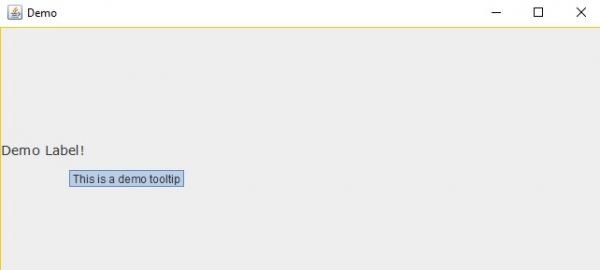
Tooltip is visible whenever you will place the mouse cursor on the label. Use the setToolTipText() method to add tooltip to JLabel −
label.setToolTipText("This is a demo tooltip");
The following is an example to add tooltip to JLabel −
Example
import java.awt.Color;
import java.awt.Font;
import javax.swing.*;
import javax.swing.border.Border;
public class SwingDemo {
   public static void main(String args[]) {
      JFrame frame = new JFrame("Demo");
      JLabel label;
      label = new JLabel("Demo Label!");
      label.setFont(new Font("Verdana", Font.PLAIN, 14));
      label.setToolTipText("This is a demo tooltip");
      Border border = BorderFactory.createLineBorder(Color.ORANGE);
      label.setBorder(border);
      frame.add(label);
      frame.setSize(500,300);
      frame.setVisible(true);
   }
}
Output

Updated on: 2019-07-30T22:30:26+05:30
1K+ Views

Advertisements