
Article Categories
- All Categories
-
 Data Structure
-
 Networking
-
 RDBMS
RDBMS
-
 Operating System
-
 Java
Java
-
 MS Excel
-
 iOS
iOS
-
 HTML
HTML
-
 CSS
CSS
-
 Android
-
 Python
-
 C Programming
-
 C++
C++
-
 C#
C#
-
 MongoDB
-
 MySQL
MySQL
-
 Javascript
-
 PHP
PHP
-
 Economics & Finance
How to Add Cookies in Postman?
We can add cookies in Postman. To add a cookie, the below steps need to be followed −
Step1 − Navigate to the Params tab below the address bar and then click on Cookies.

Step2 − The MANAGE COOKIES window shall open. It lists down all the current cookies. To add a cookie, click on the Add Cookie button. An edit box with pre-populated values of the cookie are displayed. We can update the value and Save it.
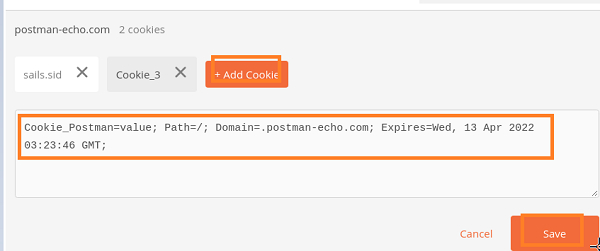
Step3 − Send the request to the server.
Step4 − After the request has been successfully completed, the Cookies tab in the Response will show the newly added cookie – Cookie_Postman.
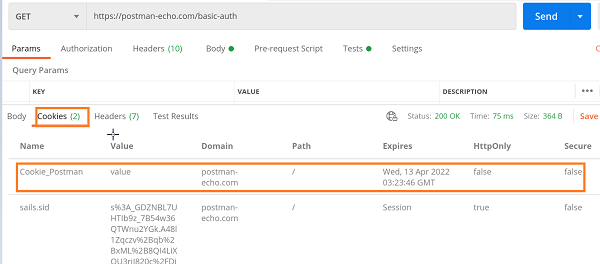
We can also add a cookie programmatically and not from the GUI. For that, we have to first create a Cookie jar object with the help of the pm.cookies.jar method.
const cnt = pm.cookies.jar()
Then to create a cookie we have to use the function - .set. This function takes the URL, cookie name and value as parameters.
const cnt = pm.cookies.jar();
cnt.set(URL, cookie name, cookie value, callback(error, cookie))

7K+ Views
