
Article Categories
- All Categories
-
 Data Structure
-
 Networking
-
 RDBMS
RDBMS
-
 Operating System
-
 Java
Java
-
 MS Excel
-
 iOS
iOS
-
 HTML
HTML
-
 CSS
CSS
-
 Android
-
 Python
-
 C Programming
-
 C++
C++
-
 C#
C#
-
 MongoDB
-
 MySQL
MySQL
-
 Javascript
-
 PHP
PHP
-
 Economics & Finance
How to add a separator for a choice box in JavaFX?
Choice box
In JavaFX a choice box is represented by the class javafx.scene.control.ChoiceBox
It has two states −
Showing − You can see the list of choices in a choice box.
Not Showing − You can see the current choice of the choice box
Separator
A separator is a horizontal or, the vertical line separating the UI elements of an application. In JavaFX the javafx.scene.control.Separator class represents a separator, to create a separator you need to instantiate this class.
Adding separator to the choice box
The choice box has an ObservableList which holds the list of choices. You can the choices to this list using add() or addAll() method as −
choiceBox.getItems().add(item);
or,
choiceBox.getItems().addAll(item1, item2, item3);
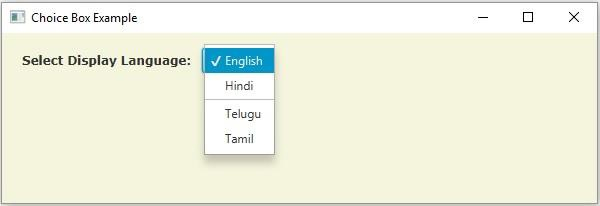
You can add the separator to the choice box using the add() or addAll() method. One of the add() method variants allows you to specify the index at which you need to add the item in the list of choices.
Example
import javafx.application.Application;
import javafx.collections.ObservableList;
import javafx.geometry.HPos;
import javafx.scene.Group;
import javafx.scene.Scene;
import javafx.scene.control.ChoiceBox;
import javafx.scene.control.Label;
import javafx.scene.control.Separator;
import javafx.scene.paint.Color;
import javafx.scene.text.Font;
import javafx.scene.text.FontPosture;
import javafx.scene.text.FontWeight;
import javafx.stage.Stage;
public class ChoiceBoxAddingSeparator extends Application {
   public void start(Stage stage) {
      //Creating a choice box
      ChoiceBox choiceBox = new ChoiceBox();
      choiceBox.setValue("English");
      //Retrieving the observable list
      ObservableList list = choiceBox.getItems();
      //Adding items to the list
      list.add("English");
      list.add("Hindi");
      list.add("Telugu");
      list.add("Tamil");
      //Creating a separator
      Separator sep = new Separator();
      sep.setMaxWidth(80);
      sep.setHalignment(HPos.CENTER);
      //Adding separator to the choice box
      list.add(2, sep);
      //Setting the position of the choice box
      choiceBox.setTranslateX(200);
      choiceBox.setTranslateY(15);
      Label label = new Label("Select Display Language:");
      Font font = Font.font("verdana", FontWeight.BOLD, FontPosture.REGULAR, 12);
      label.setFont(font);
      label.setTranslateX(20);
      label.setTranslateY(20);
      //Adding the choice box to the group
      Group root = new Group(choiceBox, label);
      //Setting the stage
      Scene scene = new Scene(root, 595, 170, Color.BEIGE);
      stage.setTitle("Choice Box Example");
      stage.setScene(scene);
      stage.show();
   }
   public static void main(String args[]){
      launch(args);
   }
}
Output

737 Views
