
Article Categories
- All Categories
-
 Data Structure
-
 Networking
-
 RDBMS
RDBMS
-
 Operating System
-
 Java
Java
-
 MS Excel
-
 iOS
iOS
-
 HTML
HTML
-
 CSS
CSS
-
 Android
-
 Python
-
 C Programming
-
 C++
C++
-
 C#
C#
-
 MongoDB
-
 MySQL
MySQL
-
 Javascript
-
 PHP
PHP
-
 Economics & Finance
How do I keep a session alive for long Selenium scripts in automation?
We can keep a session alive for long Selenium scripts in automation. In Chrome browser, this can be achieved with the help of the ChromeOptions and Capabilities classes.
Capabilities class can get the capabilities of the browser by using the method – getCapabilities. This technique is generally used for debugging a particular step in a scenario having a sizable amount of steps.
First, let us try to input text in the highlighted edit box in the below page −

Code Implementation
import org.openqa.selenium.WebDriver;
import org.openqa.selenium.WebElement;
import org.openqa.selenium.chrome.ChromeDriver;
import org.openqa.selenium.Capabilities;
import org.openqa.selenium.By;
import java.util.Map;
import java.util.concurrent.TimeUnit;
public class BrwSessionAlive{
   public static void main(String[] args)
   throws InterruptedException{
      System.setProperty("webdriver.chrome.driver",
      "C:\Users\ghs6kor\Desktop\Java\chromedriver.exe");
      WebDriver driver = new ChromeDriver();
      //obtain browser capabilities
      Capabilities cap = driver.getCapabilities();
      Map<String, Object> mp = cap.asMap();
      mp.forEach((key, value) -> {
         System.out.println("Key is: " + key + " Value is: " + value);
      });
      //implicit wait
      driver.manage().timeouts().implicitlyWait(10, TimeUnit.SECONDS);
      //url launch
      driver.
      get("https://www.tutorialspoint.com/about/about_careers.htm");
      //identify element
      WebElement e = driver.findElement(By.id("gsc-i-id1"));
      e.sendKeys("Selenium");
   }
}
Output
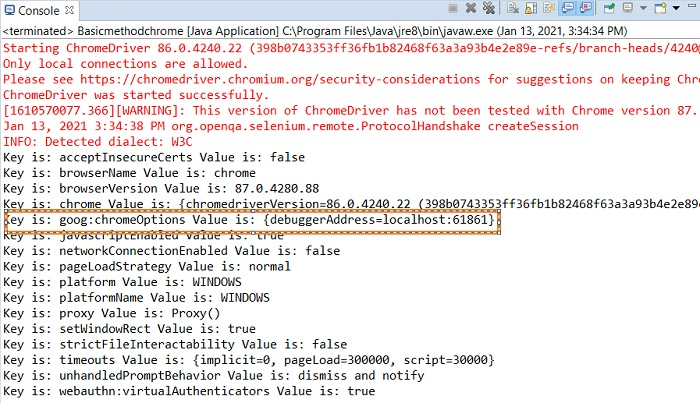
In the above image we have highlighted the parameter debuggerAddress having the value localhost:61861. We shall add this key value pair to an instance of the ChromeOptions class.
Browser
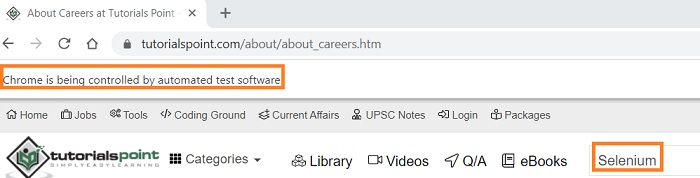
We shall now connect to this existing browser session and carry out other automation steps on it.
Code Modifications to connect to the old session.
import org.openqa.selenium.WebElement;
import org.openqa.selenium.chrome.ChromeDriver;
import org.openqa.selenium.chrome.ChromeOptions;
import org.openqa.selenium.Capabilities;
import org.openqa.selenium.By;
import java.util.Map;
import org.openqa.selenium.WebDriver;
import java.util.concurrent.TimeUnit;
public class BrwSessionAlive{
   public static void main(String[] args)
   throws InterruptedException{
      System.setProperty("webdriver.chrome.driver",
      "C:\Users\ghs6kor\Desktop\Java\chromedriver.exe");
      WebDriver driver = new ChromeDriver();
      //instance of ChromeOptions
      ChromeOptions op = new ChromeOptions();
      //configure debuggerAddress value
      op.setExperimentalOption("debuggerAddress", "localhost:61861");
      //obtain browser capabilities
      Capabilities cap = driver.getCapabilities(op);
      Map<String, Object> mp = cap.asMap();
      mp.forEach((key, value) -> {
         System.out.println("Key is: " + key + " Value is: " + value);
      });
      //implicit wait
      driver.manage().timeouts().implicitlyWait(10, TimeUnit.SECONDS);
      //identify element
      WebElement e = driver.findElement(By.id("gsc-i-id1"));
      //clear existing data
      e.clear();
      e.sendKeys("Tutorialspoint");
      String str = e.getAttribute("value");
      System.out.println("Attribute value: " + str);
   }
}
Output
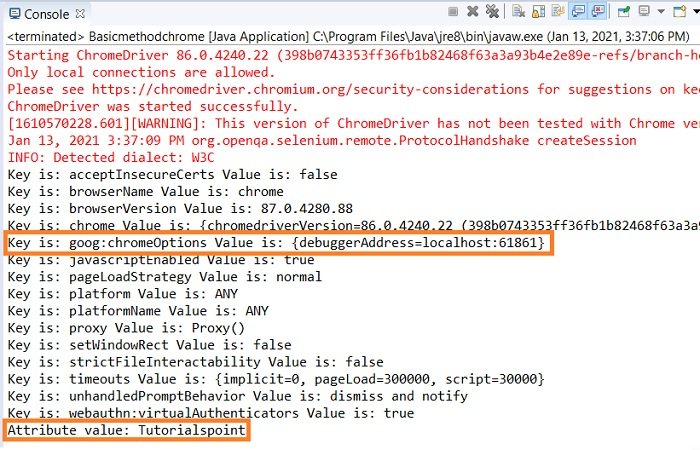
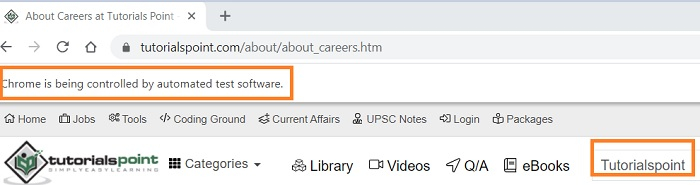
Browser

5K+ Views
