
Article Categories
- All Categories
-
 Data Structure
-
 Networking
-
 RDBMS
RDBMS
-
 Operating System
-
 Java
Java
-
 MS Excel
-
 iOS
iOS
-
 HTML
HTML
-
 CSS
CSS
-
 Android
-
 Python
-
 C Programming
-
 C++
C++
-
 C#
C#
-
 MongoDB
-
 MySQL
MySQL
-
 Javascript
-
 PHP
PHP
-
 Economics & Finance
Selected Reading
How do I get the src of an image in Selenium?
We can get the source of an image in Selenium. An image in an html document has tagname. Each image also has an attribute src which contains the source of image in the page.

To fetch any attribute in Selenium, we have to use the getAttribute() method. The method takes the attribute name as a parameter. So to get the src attribute, we have to write getAttribute("src").
Example
Code Implementation.
import org.openqa.selenium.By;
import org.openqa.selenium.WebDriver;
import org.openqa.selenium.WebElement;
import org.openqa.selenium.chrome.ChromeDriver;
import java.util.concurrent.TimeUnit;
public class Imagesrc{
   public static void main(String[] args) {
      System.setProperty("webdriver.chrome.driver", "C:\Users\ghs6kor\Desktop\Java\chromedriver.exe");
      WebDriver driver = new ChromeDriver();
      String url = "https://www.tutorialspoint.com/index.htm";
      driver.get(url);
      driver.manage().timeouts().implicitlyWait(5, TimeUnit.SECONDS);
      // identify image
      WebElement l =driver.findElement(By.xpath("//img[@title='Tutorialspoint']"));
      //getAttribute() to get src of image
      System.out.println("Src attribute is: "+ l.getAttribute("src"));
      driver.quit();
   }
}
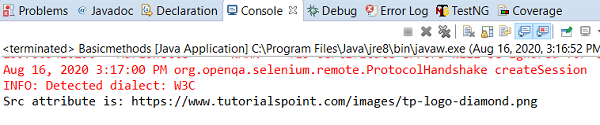
Output

Updated on: 2020-08-28T12:47:08+05:30
14K+ Views

Advertisements