
Article Categories
- All Categories
-
 Data Structure
-
 Networking
-
 RDBMS
RDBMS
-
 Operating System
-
 Java
Java
-
 MS Excel
-
 iOS
iOS
-
 HTML
HTML
-
 CSS
CSS
-
 Android
-
 Python
-
 C Programming
-
 C++
C++
-
 C#
C#
-
 MongoDB
-
 MySQL
MySQL
-
 Javascript
-
 PHP
PHP
-
 Economics & Finance
How do I download Selenium RC?
We can download Selenium RC by downloading the Java jar file − selenium−server−standalone.jar. We have to download and extract the zip file to do the actual installation.
Using the Java Client Driver, the installation can be done by the below steps −
To run the Selenium RC server, Java should be installed properly and the path of the environment variable correctly set. To check if Java is installed run the command −
java −version
Navigate to the link: https://www.selenium.dev/downloads/ and download the Selenium java client driver zip file.
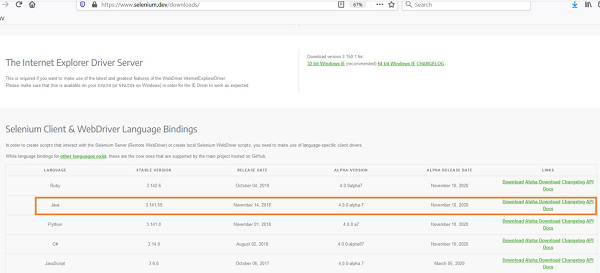
Then the selenium−java jar file is to be extracted.
Open an IDE say, Eclipse.
Create a Java project.
Associate the selenium−java jar files to the project.
Add the classpath of the selenium−java jar to the project.
Export a script to a Java file from the Selenium IDE and add it to the Java project.
Run the Selenium server with the command −
java −jar selenium−server−standalone−<version−number>.jar
Run the test from the Java IDE or from the command line.

1K+ Views
