
Article Categories
- All Categories
-
 Data Structure
-
 Networking
-
 RDBMS
RDBMS
-
 Operating System
-
 Java
Java
-
 MS Excel
-
 iOS
iOS
-
 HTML
HTML
-
 CSS
CSS
-
 Android
-
 Python
-
 C Programming
-
 C++
C++
-
 C#
C#
-
 MongoDB
-
 MySQL
MySQL
-
 Javascript
-
 PHP
PHP
-
 Economics & Finance
How can we test C# Asp.Net WebAPI?
Testing ASP.NET Web API involves sending HTTP requests and receiving responses to verify that your API endpoints work correctly. There are several effective methods to test Web APIs, including using Swagger for interactive documentation and testing, and Postman for comprehensive API testing.
Let us create a sample StudentController to demonstrate different testing approaches −
Student Model
namespace DemoWebApplication.Models {
    public class Student {
        public int Id { get; set; }
        public string Name { get; set; }
    }
}
Student Controller
Example
using DemoWebApplication.Models;
using System.Collections.Generic;
using System.Linq;
using System.Web.Http;

namespace DemoWebApplication.Controllers {
    public class StudentController : ApiController {
        List<Student> students = new List<Student> {
            new Student {
                Id = 1,
                Name = "Mark"
            },
            new Student {
                Id = 2,
                Name = "John"
            }
        };

        public IEnumerable<Student> Get() {
            return students;
        }

        public Student Get(int id) {
            var studentForId = students.FirstOrDefault(x => x.Id == id);
            return studentForId;
        }
    }
}
Testing Using Swagger
Swagger is a specification for documenting REST APIs that provides an interactive interface for testing endpoints. It automatically generates documentation and allows you to test API methods directly from the browser interface.
Setting Up Swagger
Install the Swagger package using NuGet Package Manager −
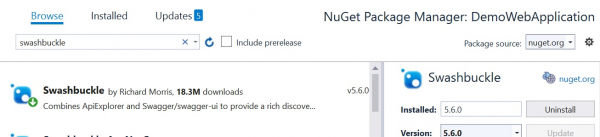
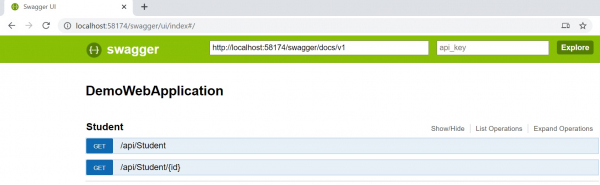
After installation, run your Web API project and navigate to /swagger/ui/index in the URL. Swagger automatically discovers and lists all controllers and their action methods −
Testing GET All Students
Expand the Student controller to see available endpoints and click "Try it out" to test the GET method −
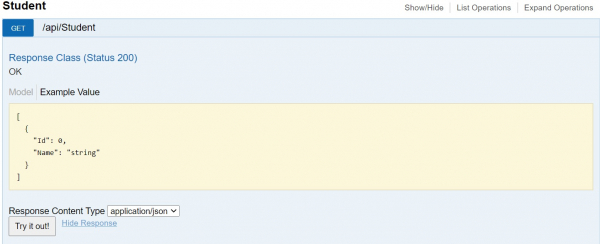
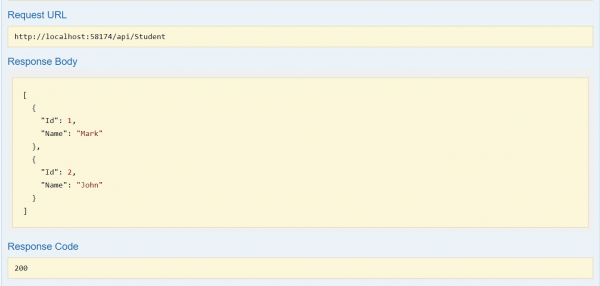
The response shows all students in JSON format −
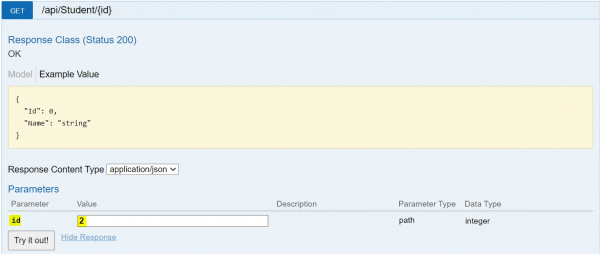
Testing GET Student by ID
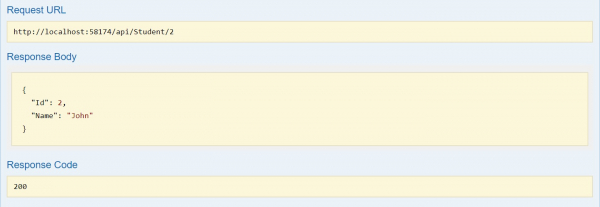
To test the parameterized GET method, enter an ID value and execute the request −
The response returns the specific student data −
Testing Using Postman
Postman is a powerful API testing tool that allows developers to create, test, and document APIs efficiently. It provides a user-friendly interface for sending HTTP requests and analyzing responses.
Postman can be used as a standalone application or through a web browser interface −

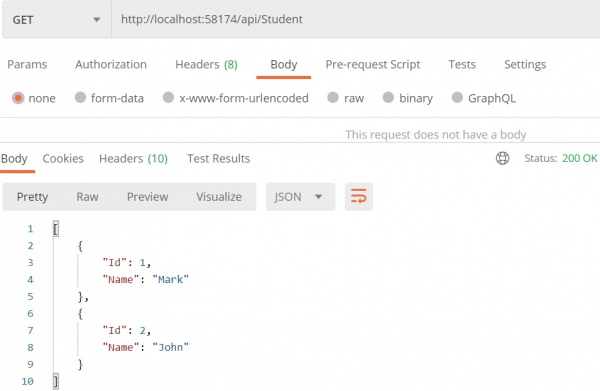
Testing GET All Students in Postman
Create a new GET request with the API endpoint URL. Postman displays both the request details and the JSON response −
Testing GET Student by ID in Postman
For parameterized requests, append the ID to the URL path. Postman shows the specific student data in the response −

Comparison of Testing Methods
| Feature | Swagger | Postman |
|---|---|---|
| Setup | Automatic with package installation | Requires separate application/account |
| Documentation | Auto-generated from code annotations | Manual documentation creation |
| Testing Features | Basic request/response testing | Advanced testing, collections, scripts |
| Team Collaboration | Limited | Extensive sharing and collaboration |
Conclusion
Both Swagger and Postman are effective tools for testing ASP.NET Web APIs. Swagger provides automatic documentation and basic testing capabilities directly integrated with your API, while Postman offers more comprehensive testing features and better collaboration options for development teams.

2K+ Views
