
Article Categories
- All Categories
-
 Data Structure
-
 Networking
-
 RDBMS
RDBMS
-
 Operating System
-
 Java
Java
-
 MS Excel
-
 iOS
iOS
-
 HTML
HTML
-
 CSS
CSS
-
 Android
-
 Python
-
 C Programming
-
 C++
C++
-
 C#
C#
-
 MongoDB
-
 MySQL
MySQL
-
 Javascript
-
 PHP
PHP
-
 Economics & Finance
Selected Reading
How can we set Mnemonic Key Radio Button in Java?
Mnemonic key is set so that a user can use Keyboard keys to select a Radio Button. For example, a key can be set with ALT −
radio2.setMnemonic(KeyEvent.VK_R);
Above, we have set key ALT+R for radio2.
The following is an example to set Mnemonic key radio button −
package my;
import java.awt.FlowLayout;
import java.awt.event.KeyEvent;
import javax.swing.ButtonGroup;
import javax.swing.JFrame;
import javax.swing.JLabel;
import javax.swing.JRadioButton;
public class SwingDemo {
   public static void main(String[] args) {
      JRadioButton radio1 = new JRadioButton("Male");
      JRadioButton radio2 = new JRadioButton("Female");
      radio2.setMnemonic(KeyEvent.VK_R);
      ButtonGroup group = new ButtonGroup();
      group.add(radio1);
      group.add(radio2);
      radio1.setSelected(true);
      JFrame frame = new JFrame();
      frame.setLayout(new FlowLayout());
      frame.setDefaultCloseOperation(JFrame.EXIT_ON_CLOSE);
      frame.add(new JLabel("Select Gender:"));
      frame.add(radio1);
      frame.add(radio2);
      frame.pack();
      frame.setVisible(true);
   }
}
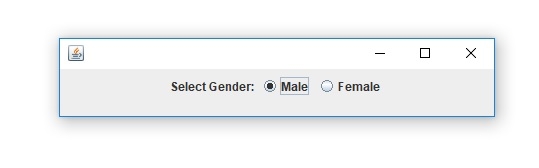
The output is as follows. When you will press Alt+R, you will be able to select the radio buttons.
Output

Updated on: 2019-07-30T22:30:26+05:30
645 Views

Advertisements