
Article Categories
- All Categories
-
 Data Structure
-
 Networking
-
 RDBMS
RDBMS
-
 Operating System
-
 Java
Java
-
 MS Excel
-
 iOS
iOS
-
 HTML
HTML
-
 CSS
CSS
-
 Android
-
 Python
-
 C Programming
-
 C++
C++
-
 C#
C#
-
 MongoDB
-
 MySQL
MySQL
-
 Javascript
-
 PHP
PHP
-
 Economics & Finance
Selected Reading
How can we rotate a JLabel text in Java?
A JLabel is a subclass of JComponent class and an object of JLabel provides text instructions or information on a GUI. A JLabel can display a single line of read-only text, an image or both text and an image. A JLabel can explicitly generate a PropertyChangeListener interface.
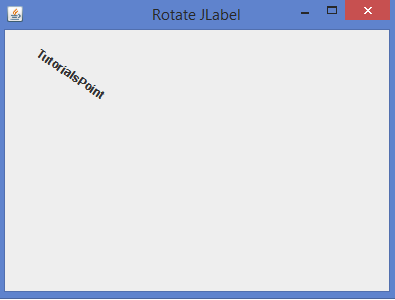
By default, JLabel can display a text in the horizontal position and we can rotate a JLabel text by implementing the rotate() method of Graphics2D class inside the paintComponent().
Syntax
public abstract void rotate(double theta, double x, double y)
Example
import java.awt.*;
import java.awt.geom.*;
import javax.swing.*;
public class RotateJLabelTest extends JFrame {
   public RotateJLabelTest() {
      setTitle("Rotate JLabel");
      JLabel label = new RotateLabel("TutorialsPoint");
      add(label, BorderLayout.CENTER);
      setSize(400, 300);
      setDefaultCloseOperation(EXIT_ON_CLOSE);
      setLocationRelativeTo(null);
      setVisible(true);
   }
   private class RotateLabel extends JLabel {
      public RotateLabel(String text) {
         super(text);
         Font font = new Font("Verdana", Font.ITALIC, 10);
         FontMetrics metrics = new FontMetrics(font){};
         Rectangle2D bounds = metrics.getStringBounds(text, null);
         setBounds(0, 0, (int) bounds.getWidth(), (int) bounds.getHeight());
      }
      @Override
      public void paintComponent(Graphics g) {
<strong>         </strong>Graphics2D gx = (Graphics2D) g;
         gx.rotate(0.6, getX() + getWidth()/2, getY() + getHeight()/2);
         super.paintComponent(g);
      }
   }
   public static void main(String[] args) {
      new RotateJLabelTest();
   }
}
Output

Updated on: 2020-07-03T11:56:43+05:30
3K+ Views

Advertisements