
Article Categories
- All Categories
-
 Data Structure
-
 Networking
-
 RDBMS
RDBMS
-
 Operating System
-
 Java
Java
-
 MS Excel
-
 iOS
iOS
-
 HTML
HTML
-
 CSS
CSS
-
 Android
-
 Python
-
 C Programming
-
 C++
C++
-
 C#
C#
-
 MongoDB
-
 MySQL
MySQL
-
 Javascript
-
 PHP
PHP
-
 Economics & Finance
Selected Reading
How can we implement line wrap and word wrap text inside a JTextArea in Java?
A JTextArea is a multi-line text component to display text or allow the user to enter the text and it will generate a CaretListener interface when we are trying to implement the functionality of the JTextArea component. A JTextArea class inherits the JTextComponent class in Java.
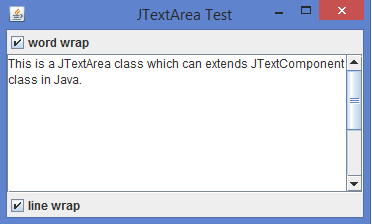
In the below example, we can implement a JTextArea class with a user can select either word wrap or line wrap checkboxes using the ItemListener interface.
Example
import javax.swing.*;
import java.awt.*;
import java.awt.event.*;
public class JTextAreaTest {
   public static void main(String[] args ) {
      EventQueue.invokeLater(new Runnable() {
         @Override
         public void run() {
            JFrame frame = new JFrame("JTextArea Test");
            frame.setSize(350, 275);
            final JTextArea textArea = new JTextArea(15, 65);
            frame.add(new JScrollPane(textArea));
            final JCheckBox wordWrap = new JCheckBox("word wrap");
            wordWrap.setSelected(textArea.getWrapStyleWord());
            wordWrap.addItemListener(new ItemListener() {
               @Override
               public void itemStateChanged(ItemEvent ie) {
                  textArea.setWrapStyleWord(wordWrap.isSelected());
               }
            });
            frame.add(wordWrap, BorderLayout.NORTH);
            final JCheckBox lineWrap = new JCheckBox("line wrap");
            lineWrap.setSelected(textArea.getLineWrap());
            lineWrap.addItemListener(new ItemListener() {
               @Override
               public void itemStateChanged(ItemEvent ie) {
                  textArea.setLineWrap(lineWrap.isSelected());
               }
            });
            frame.add(lineWrap, BorderLayout.SOUTH );
            frame.setLocationRelativeTo(null);
            frame.setDefaultCloseOperation(JFrame.EXIT_ON_CLOSE );
            frame.setVisible(true);
         }
      });
   }
}
Output

Updated on: 2020-02-07T11:06:02+05:30
1K+ Views

Advertisements