
Article Categories
- All Categories
-
 Data Structure
-
 Networking
-
 RDBMS
RDBMS
-
 Operating System
-
 Java
Java
-
 MS Excel
-
 iOS
iOS
-
 HTML
HTML
-
 CSS
CSS
-
 Android
-
 Python
-
 C Programming
-
 C++
C++
-
 C#
C#
-
 MongoDB
-
 MySQL
MySQL
-
 Javascript
-
 PHP
PHP
-
 Economics & Finance
Selected Reading
How can I get all element's immediate children with css selectors using selenium?
We can get all element’s immediate children with css selectors. We have to use findElements() method to get immediate children. This method will return a list of elements matching css selector.
In a css selector if we need to traverse from parent to child we use > symbol. To get all the immediate children we have to specify * symbol after parent node in the css expression. So the customized css should be parent > *.
So for a
- , the css for immediate children shall be ul.toc.chapters >*.
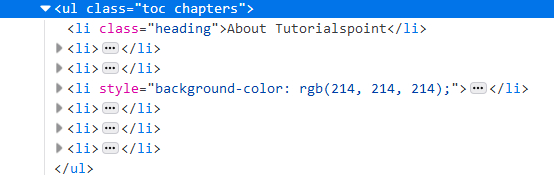
Example
Code Implementation.
import org.openqa.selenium.By;
import org.openqa.selenium.WebDriver;
import org.openqa.selenium.WebElement;
import org.openqa.selenium.chrome.ChromeDriver;
import java.util.concurrent.TimeUnit;
import java.util.List;
public class ImdtChildrenCss{
   public static void main(String[] args) {
      System.setProperty("webdriver.chrome.driver", "C:\Users\ghs6kor\Desktop\Java\chromedriver.exe");
      WebDriver driver = new ChromeDriver();
      String url = "https://www.tutorialspoint.com/about/about_careers.htm";
      driver.get(url);
      driver.manage().timeouts().implicitlyWait(5, TimeUnit.SECONDS);
      // identify and store immediate children of parent in css
      List<WebElement> l = driver.findElements(By.cssSelector("ul.toc.chapters" + ">*"));
      // Iterate list and get the children
      for (int i =0; i< l.size(); i++) {
         System.out.println(l.get(i).getText());
      }
      driver.quit();
   }
}
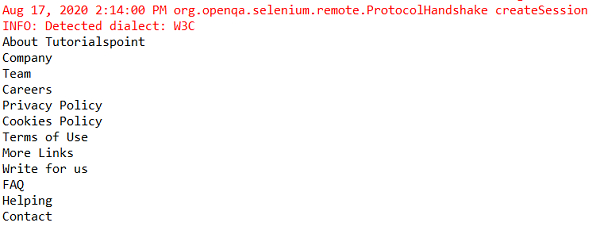
Output

Updated on: 2020-08-28T12:57:06+05:30
3K+ Views

Advertisements