
Article Categories
- All Categories
-
 Data Structure
-
 Networking
-
 RDBMS
RDBMS
-
 Operating System
-
 Java
Java
-
 MS Excel
-
 iOS
iOS
-
 HTML
HTML
-
 CSS
CSS
-
 Android
-
 Python
-
 C Programming
-
 C++
C++
-
 C#
C#
-
 MongoDB
-
 MySQL
MySQL
-
 Javascript
-
 PHP
PHP
-
 Economics & Finance
Selected Reading
Getting every child widget of a Tkinter window
In order to get the information about the widgets, tkinter provides a set of methods that can be used to test the widgets in an application. In order to get the list of all the child widgets, we can use the winfo_children() method.
Example
In this example, we have defined some widgets in a frame and by using the winfo_children() method, we will print the list containing the names of all the widgets.
#Import tkinter library
from tkinter import *
#Create an instance of tkinter frame
win = Tk()
#Set the geometry
win.geometry("750x200")
#Create a frame
frame= Frame(win)
#Create label, button widgets
Label(frame, text= "Top Level Text", font= ('Helvetica 20 bold')).pack(pady=20)
Button(frame, text= "Left").pack(side=LEFT)
Button(frame, text= "Right").pack(side= RIGHT)
Button(frame, text= "Center").pack(side= BOTTOM)
frame.pack()
#Print the List of all Child widget Information
print(frame.winfo_children())
win.mainloop()
Output
Executing the above code will display a window with a label and three buttons,
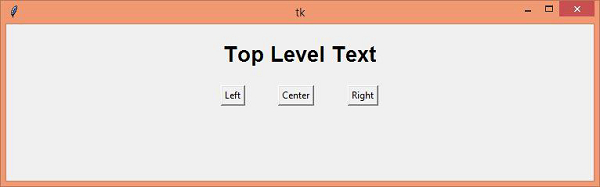
On the console, it will print the list of all the widgets defined in frame widget.
[<tkinter.Label object .!frame.!label>, <tkinter.Button object .!frame.!button>, <tkinter.Button object .!frame.!button2>, <tkinter.Button object .!frame.!button3>]

Updated on: 2021-04-15T13:28:18+05:30
15K+ Views

Advertisements