
Article Categories
- All Categories
-
 Data Structure
-
 Networking
-
 RDBMS
RDBMS
-
 Operating System
-
 Java
Java
-
 MS Excel
-
 iOS
iOS
-
 HTML
HTML
-
 CSS
CSS
-
 Android
-
 Python
-
 C Programming
-
 C++
C++
-
 C#
C#
-
 MongoDB
-
 MySQL
MySQL
-
 Javascript
-
 PHP
PHP
-
 Economics & Finance
Selected Reading
Explain DELETE request in Rest Assured.
We can execute the DELETE requests in Rest Assured. This is done with the help of the http DELETE method. It is responsible for deleting a server resource.
Delete request can have a request or response body. The status codes available for a DELETE request are listed below −
- 200 (OK)
- 204 (if there is no content for the record that we want to delete)
- 202 (Accepted, deletion is not a single operation).
We shall first send a DELETE request via Postman on an endpoint − https://dummy.restapiexample.com/api/v1/delete/100
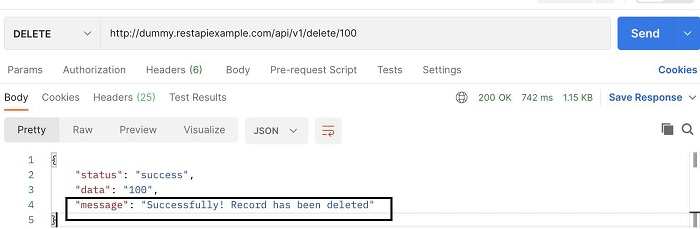
Using Rest Assured, we shall check if the response body contains the string Successfully! Record has been deleted.
Example
Code Implementation
import org.testng.Assert;
import org.testng.annotations.Test;
import io.restassured.RestAssured;
import io.restassured.response.Response;
import io.restassured.specification.RequestSpecification;
public class NewTest {
   @Test
   public void deleteRequest() {
      int record = 100;

      //base URI with Rest Assured class
      RestAssured.baseURI ="https://dummy.restapiexample.com/api/v1/";

      //input details
      RequestSpecification r = RestAssured.given();

      //request header
      r.header("Content-Type", "application/json");

      //capture response from Delete request
      Response res = r.delete("/delete/"+ record);

      //verify status code of Response
      int s = res.getStatusCode();
      Assert.assertEquals(s, 200);

      //convert response to string then validate
      String jsonString =res.asString();
      Assert.assertEquals
      (jsonString.contains("Successfully! Record has been deleted"), true);
   }
}
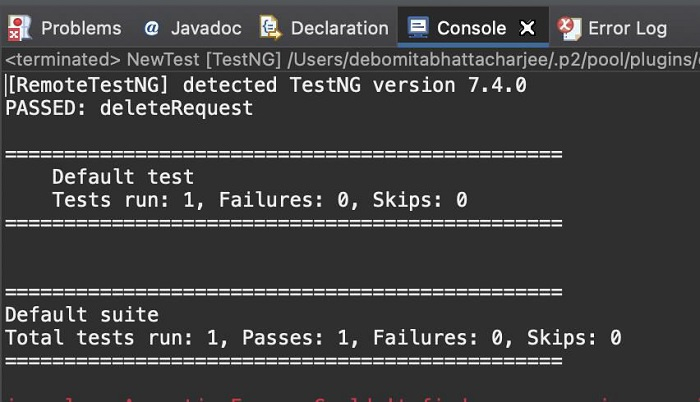
Output

Updated on: 2021-11-17T13:28:54+05:30
3K+ Views

Advertisements