
Article Categories
- All Categories
-
 Data Structure
-
 Networking
-
 RDBMS
RDBMS
-
 Operating System
-
 Java
Java
-
 MS Excel
-
 iOS
iOS
-
 HTML
HTML
-
 CSS
CSS
-
 Android
-
 Python
-
 C Programming
-
 C++
C++
-
 C#
C#
-
 MongoDB
-
 MySQL
MySQL
-
 Javascript
-
 PHP
PHP
-
 Economics & Finance
Selected Reading
Error:selenium.common.exceptions.WebDriverException: Message: 'chromedriver' executable needs to be in PATH using Selenium
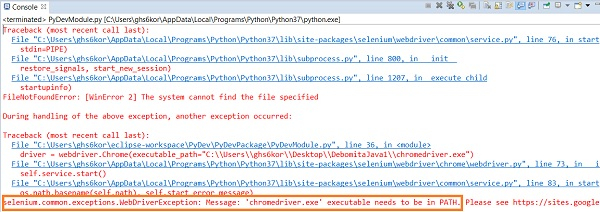
We can get the error selenium.common.exceptions.WebDriverException if the path of the chromedriver.exe executable file is not set properly or incorrect within the webdriver.Chrome(). The below image shows such an exception.
It can be resolved by the following ways −
Verify the path of the chromedriver.exe file set within webdriver.Chrome.
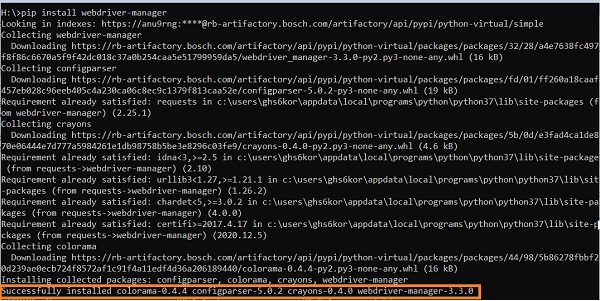
Install the webdriver manager with the command: pip install webdrivermanager. Then add the statement: from webdriver_manager.chrome import ChromeDriverManager in our code.
Example
Code Implementation with webdriver manager
from selenium import webdriver
from webdriver_manager.chrome import ChromeDriverManager
#configure webdriver manager
driver = webdriver.Chrome(ChromeDriverManager().install())
driver.implicitly_wait(0.5)
#launch URL
driver.get("https://www.tutorialspoint.com/index.htm")
print("URL is: ")
print(driver.current_url)
driver.close()
Output


Updated on: 2021-04-08T07:44:22+05:30
2K+ Views

Advertisements