
Article Categories
- All Categories
-
 Data Structure
-
 Networking
-
 RDBMS
RDBMS
-
 Operating System
-
 Java
Java
-
 MS Excel
-
 iOS
iOS
-
 HTML
HTML
-
 CSS
CSS
-
 Android
-
 Python
-
 C Programming
-
 C++
C++
-
 C#
C#
-
 MongoDB
-
 MySQL
MySQL
-
 Javascript
-
 PHP
PHP
-
 Economics & Finance
Selected Reading
Downloading with chrome headless and selenium.
We can download Chrome in headless mode in Selenium. The headless execution is one of the ways saving resources by not utilizing the complete graphical interface.
After the version 59, Chrome can be used in headless mode. The ChromeOptions class is used to modify the default character of the browser. The parameter headless is passed as a parameter to the addArgument method for headless execution.
Syntax
ChromeOptions o = new ChromeOptions();
o.addArguments("headless");
WebDriver driver = new ChromeDriver(o);
Example
Code Implementation.
import org.openqa.selenium.By;
import org.openqa.selenium.WebDriver;
import org.openqa.selenium.WebElement;
import org.openqa.selenium.chrome.ChromeDriver;
import org.openqa.selenium.chrome.ChromeOptions;
import java.util.concurrent.TimeUnit;
public class HeadlessChrome{
   public static void main(String[] args) {
      System.setProperty("webdriver.chrome.driver", "C:\Users\ghs6kor\Desktop\Java\chromedriver.exe");
      //ChromeOptions object creation
      ChromeOptions o = new ChromeOptions();
      //headless argument added
      o.addArguments("headless");
      // add options parameter to Chrome driver
      WebDriver driver = new ChromeDriver(o);
      // wait of 5 seconds
      driver.manage().timeouts().implicitlyWait(5, TimeUnit.SECONDS);
      driver.get("https://www.tutorialspoint.com/questions/index.php");
      // get page title
      System.out.println("Page title: " + driver.getTitle());
   }
}
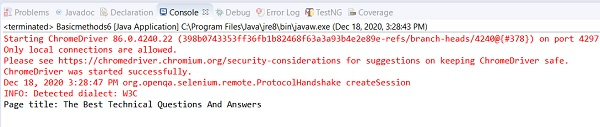
Output

Updated on: 2020-12-28T13:05:46+05:30
886 Views

Advertisements