
Article Categories
- All Categories
-
 Data Structure
-
 Networking
-
 RDBMS
RDBMS
-
 Operating System
-
 Java
Java
-
 MS Excel
-
 iOS
iOS
-
 HTML
HTML
-
 CSS
CSS
-
 Android
-
 Python
-
 C Programming
-
 C++
C++
-
 C#
C#
-
 MongoDB
-
 MySQL
MySQL
-
 Javascript
-
 PHP
PHP
-
 Economics & Finance
Selected Reading
Downloading file to specified location with Selenium and python.
We can download files to a specified location with Selenium in Python. This is done by the help of the ChromeOptions class. We shall set the preferences of the browser and pass the download.default_directory parameter.
We need to mention the path of the download directory with that parameter. This preference is sent to the ChromeOptions object with the add_experimental_option method.
Finally, this browser information is shared with the driver object.
Syntax
op = webdriver.ChromeOptions()
p = ("download.default_directory": "C:\Users", "safebrowsing.enabled":"false")
op.add_experimental_option("prefs", p)
driver = webdriver.Chrome(chrome_options=op)
Example
Code Implementation.
from selenium import webdriver
from selenium.webdriver.common.by import By
#object of ChromeOptions
op = webdriver.ChromeOptions()
#set download directory path
p = ("download.default_directory": "C:\Users""safebrowsing.enabled":"false")
#adding preferences to ChromeOptions
op.add_experimental_option("prefs", p)
driver = webdriver.Chrome(executable_path="C:\chromedriver.exe", chrome_options=op)
driver.implicitly_wait(0.4)
driver.get("https://www.seleniumhq.org/download/");
#identify element
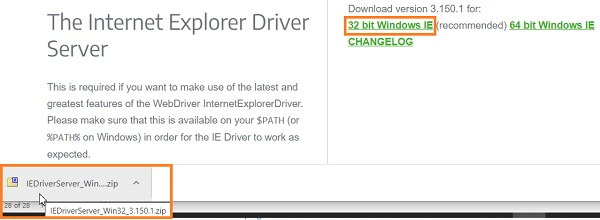
m = driver.find_element_by_link_text("32 bit Windows IE")
m.click()
Output

Updated on: 2020-12-28T13:47:25+05:30
7K+ Views

Advertisements