
Article Categories
- All Categories
-
 Data Structure
-
 Networking
-
 RDBMS
RDBMS
-
 Operating System
-
 Java
Java
-
 MS Excel
-
 iOS
iOS
-
 HTML
HTML
-
 CSS
CSS
-
 Android
-
 Python
-
 C Programming
-
 C++
C++
-
 C#
C#
-
 MongoDB
-
 MySQL
MySQL
-
 Javascript
-
 PHP
PHP
-
 Economics & Finance
Selected Reading
Download a new library in Arduino IDE
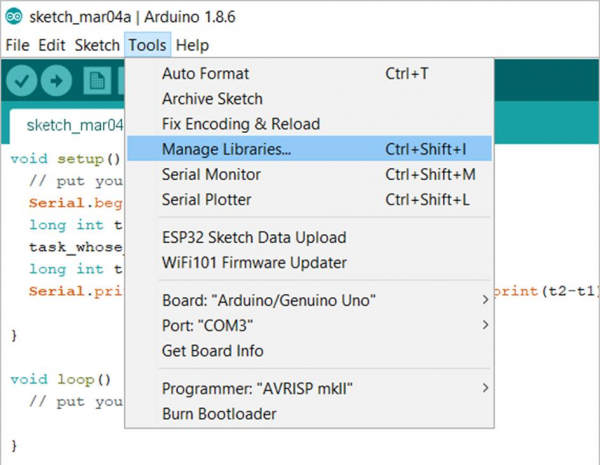
In order to download a new library, go to Tools -> Manage Libraries
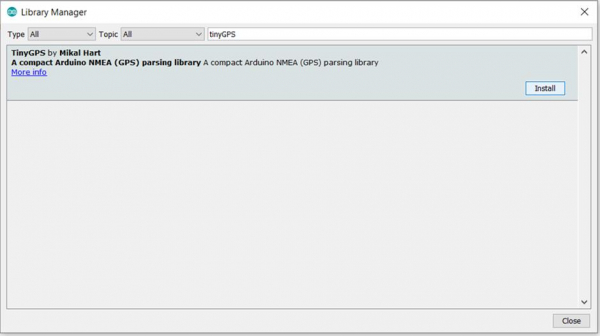
Search for the library of your interest in the window that opens up. Click on the desired library, and click Install.
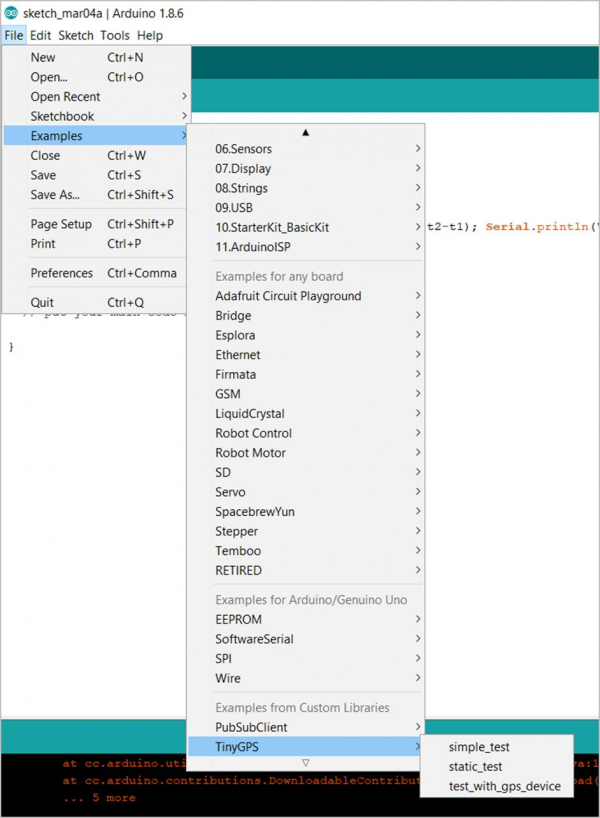
This will Install the library and you will be able to see the example specific to the library from File -> Examples.

Updated on: 2021-03-23T11:09:13+05:30
404 Views

Advertisements