
Article Categories
- All Categories
-
 Data Structure
-
 Networking
-
 RDBMS
RDBMS
-
 Operating System
-
 Java
Java
-
 MS Excel
-
 iOS
iOS
-
 HTML
HTML
-
 CSS
CSS
-
 Android
-
 Python
-
 C Programming
-
 C++
C++
-
 C#
C#
-
 MongoDB
-
 MySQL
MySQL
-
 Javascript
-
 PHP
PHP
-
 Economics & Finance
Selected Reading
Creating a new remote source in SAP HANA using SQL
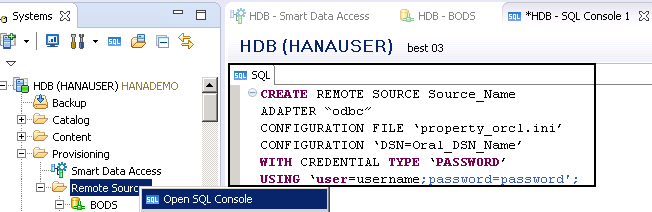
You can also create a remote source using SQL statement as below −
CREATE REMOTE SOURCE Source_Name
ADAPTER “odbc”
CONFIGURATION FILE ‘property_orcl.ini’
CONFIGURATION ‘DSN=oral_DSN_Name’
WITH CREDENTIAL TYPE ‘PASSWORD’
USING ‘user=username;password=password′;
In this SQL statement-
In above statement,
To open SQL console, right click on Remote Source → Open SQL Console.

Updated on: 2020-02-24T09:16:26+05:30
2K+ Views

Advertisements