
Article Categories
- All Categories
-
 Data Structure
-
 Networking
-
 RDBMS
RDBMS
-
 Operating System
-
 Java
Java
-
 MS Excel
-
 iOS
iOS
-
 HTML
HTML
-
 CSS
CSS
-
 Android
-
 Python
-
 C Programming
-
 C++
C++
-
 C#
C#
-
 MongoDB
-
 MySQL
MySQL
-
 Javascript
-
 PHP
PHP
-
 Economics & Finance
Selected Reading
Convert string to lowercase or uppercase in Arduino
In order to convert a string to lower/upper case, the in-built .toLowerCase() and .toUpperCase() functions can be used.
Note: These functions change the original string itself, and don't return a new string with the changes.
The implementation is shown below −
Example
void setup() {
   Serial.begin(9600);
   Serial.println();
   String s1 = "Hello World";
   Serial.println(s1);
   s1.toLowerCase();
   Serial.println(s1);
   s1.toUpperCase();
   Serial.println(s1);
}
void loop() {
   // put your main code here, to run repeatedly:
}
The corresponding Serial Monitor output is −
Output
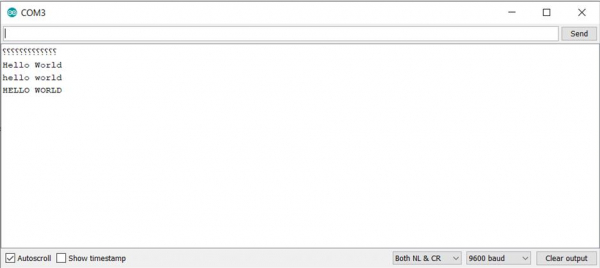
As you can see, the changes have been made in s1 itself. The return of .toUpperCase() and .toLowerCase() is void.

Updated on: 2021-03-24T05:24:09+05:30
7K+ Views

Advertisements