
Article Categories
- All Categories
-
 Data Structure
-
 Networking
-
 RDBMS
RDBMS
-
 Operating System
-
 Java
Java
-
 MS Excel
-
 iOS
iOS
-
 HTML
HTML
-
 CSS
CSS
-
 Android
-
 Python
-
 C Programming
-
 C++
C++
-
 C#
C#
-
 MongoDB
-
 MySQL
MySQL
-
 Javascript
-
 PHP
PHP
-
 Economics & Finance
Concatenate strings in Arduino
String concatenation in Arduino is quite straightforward and also robust. You simply use the + operator to join strings. However, it doesn't end with joining two strings. You can concatenate characters, and even integers and floats to strings (Arduino converts the integers and floating-point numbers to string internally). Examples can be seen in the below code.
Example
void setup() {
   Serial.begin(9600);
   Serial.println();
   // put your setup code here, to run once:
   String s1 = "Hello ";
   String s2 = "Bond!";
   String s3 = s1 + s2;
   Serial.println(s3);
   s3 = s1 + 7;
   Serial.println(s3);
   s3 = s1 + 'J';
   Serial.println(s3);
   s3 = s1 + 0.07;
   Serial.println(s3);
   s3 = s1 + millis();
   Serial.println(s3);
   s3 = s1 + s2 + ", James Bond!";
   Serial.println(s3);
}
void loop() {
   // put your main code here, to run repeatedly:
}
The output of this code is shown below −
Output
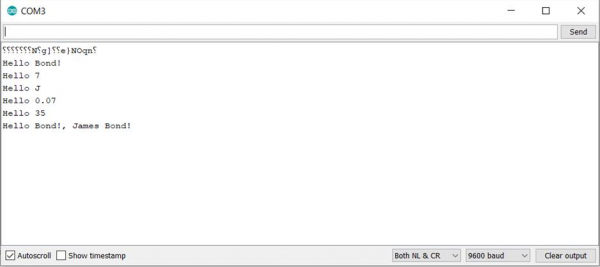
As you can see, we've successfully concatenated a string with another string, a character, an integer and even a floating-point number.
What this means that we can also concatenate the string with a function that outputs either a string, a character, an integer, or a floating-point number. We showed that by concatenating a string with the millis() function. Also, more than 2 strings can be concatenated in one statement, as shown by the last example in the above code.

16K+ Views
