
Article Categories
- All Categories
-
 Data Structure
-
 Networking
-
 RDBMS
RDBMS
-
 Operating System
-
 Java
Java
-
 MS Excel
-
 iOS
iOS
-
 HTML
HTML
-
 CSS
CSS
-
 Android
-
 Python
-
 C Programming
-
 C++
C++
-
 C#
C#
-
 MongoDB
-
 MySQL
MySQL
-
 Javascript
-
 PHP
PHP
-
 Economics & Finance
Selected Reading
Change the default location for saving sketches in Arduino IDE
By default, on a Windows machine, Arduino saves all the sketches in C:\Users\
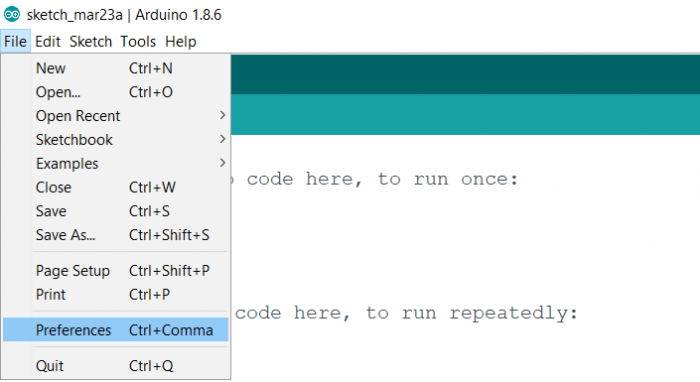
In order to change the default location, go to File → Preferences.
In the dialog box that opens up, the first input field is the Sketchbook location. Click on the ‘Browse’ button next to it and choose your desired path.
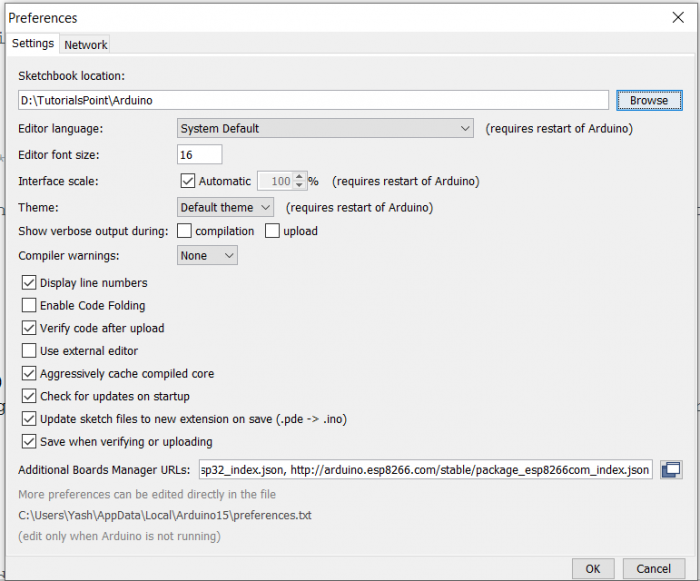
After changing the path, click OK. Now, if you try to save a new sketch, Arduino will default to the location you specified.

Updated on: 2021-05-29T13:08:43+05:30
1K+ Views

Advertisements