
Article Categories
- All Categories
-
 Data Structure
-
 Networking
-
 RDBMS
RDBMS
-
 Operating System
-
 Java
Java
-
 MS Excel
-
 iOS
iOS
-
 HTML
HTML
-
 CSS
CSS
-
 Android
-
 Python
-
 C Programming
-
 C++
C++
-
 C#
C#
-
 MongoDB
-
 MySQL
MySQL
-
 Javascript
-
 PHP
PHP
-
 Economics & Finance
Selected Reading
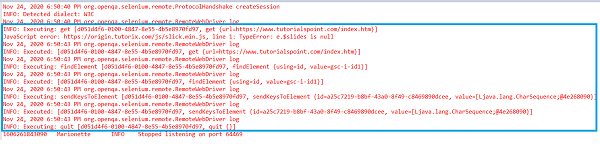
Capturing browser logs with Selenium WebDriver using Java.
We can capture browser logs with Selenium. We have to type cast the RemoteWebDriver to driver and then initialize it. Next, we have to use the setLogLevel method. The import org.openqa.selenium.remote.RemoteWebDriver statement needs to be added in code for the RemoteWebDriver.
Syntax
((RemoteWebDriver) driver).setLogLevel(Level.INFO);
Example
import org.openqa.selenium.By;
import org.openqa.selenium.WebDriver;
import org.openqa.selenium.WebElement;
import org.openqa.selenium.chrome.ChromeDriver;
import org.openqa.selenium.remote.RemoteWebDriver
import java.util.logging.Level;
public class BrwLogs{
   public static void main(String[] args) {
      System.setProperty("webdriver.chrome.driver",
      "C:\Users\ghs6kor\Desktop\Java\chromedriver.exe");
      WebDriver driver = new ChromeDriver();
      // Enable logging with setLogLevel method
      ((RemoteWebDriver) driver).setLogLevel(Level.INFO);
      driver.get("https://www.tutorialspoint.com/index.htm");
      //identify element
      driver.findElement(By.id("gsc−i−id1")).sendKeys("Selenium");
      driver.quit();
   }
}
Output

Updated on: 2020-11-30T10:25:01+05:30
1K+ Views

Advertisements