
Article Categories
- All Categories
-
 Data Structure
-
 Networking
-
 RDBMS
RDBMS
-
 Operating System
-
 Java
Java
-
 MS Excel
-
 iOS
iOS
-
 HTML
HTML
-
 CSS
CSS
-
 Android
-
 Python
-
 C Programming
-
 C++
C++
-
 C#
C#
-
 MongoDB
-
 MySQL
MySQL
-
 Javascript
-
 PHP
PHP
-
 Economics & Finance
A Game Using Javascript – Fire the bullets
This tutorial demonstrates how to create an action-packed commando game using JavaScript and Code.org's Game Lab. The player controls a commando navigating through a maze-like area filled with enemy tanks, collecting keys, and escaping through a door.
Game Story and Rules
The player controls a commando using arrow keys (UP, DOWN, LEFT, RIGHT) to navigate through a walled area. The objective is to find the correct key and reach the exit door while avoiding enemy fire. Enemy tanks automatically shoot bullets when the commando enters their range. The commando has a protective shield activated by pressing the 's' key, which provides temporary protection but has limited duration. Success requires reaching the door with the right key while surviving the enemy attacks.
Game Setup Steps
Project Preparation
Step 1 ? Create a new folder named "firethebulletsgame" and save all game images with small file sizes.
Step 2 ? Use background removal tools to create transparent PNG images for all game sprites.
Step 3 ? Sign up or log into Code.org and access the Game Lab environment.
Step 4 ? Upload all prepared images via Animation Tab ? New Animation ? Upload Image.
Required Game Assets
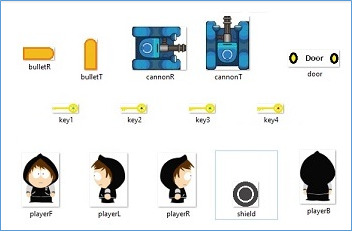
Game Development Process
Core Development Steps
Step 1 ? Initialize variables and create sprites for the commando, shield, keys, door, walls, and enemy tanks with appropriate animations.
Step 2 ? Use random number generation to designate one key as the correct door key.
Step 3 ? Implement player movement controls using arrow key detection.
Step 4 ? Create essential functions: draw(), throwBullet(), hitBullet(), pickthekey(), and result().
Step 5 ? Program collision detection for key collection when the commando touches keys.
Step 6 ? Implement game over conditions displaying "You Lose" when the commando is hit.
Step 7 ? Program victory conditions showing "You Win" when reaching the door with the correct key.
Complete Game Code
var gameState = 0;
var playerAlive = true;
var bullet1,bullet2,bullet3,bullet4;
var bulletGroup = createGroup();
var rand = randomNumber(1,4);
var rightKey = 0;
var workingBullet = true;
var time = 200;

//player
var commando = createSprite(40,365,30,30);
commando.setAnimation("playerR");
commando.scale = 0.1;
commando.setCollider("circle",0,0,200);

//shield
var shield = createSprite(commando.x,commando.y,50,50);
shield.setAnimation("shield");
shield.visible = false;

//door
var door1=createSprite(300,10,50,50);

//keys
var key1=createSprite(110,300,10,10);
var key2=createSprite(290,210,10,10);
var key3=createSprite(90,190,10,10);
var key4=createSprite(50,100,10,10);

//walls
var wall1 = createSprite(131,10,255,10);
var wall2 = createSprite(366,10,48,10);
var wall3 = createSprite(5,200,10,380);
var wall4 = createSprite(395,200,10,380);
var wall5 = createSprite(235,390,330,10);
var wall6 = createSprite(200,280,260,10);
var wall7 = createSprite(100,227,200,10);
var wall8 = createSprite(265,70,10,100);
var wall9 = createSprite(135,65,135,10);
var wall10 = createSprite(35,120,75,10);
var wall11 = createSprite(296,120,72,10);
var wall12 = createSprite(70,92,10,65);
var wall13 = createSprite(330,92,10,65);
var wall14 = createSprite(70,200,10,62);
var wall15 = createSprite(200,201,10,62);
var wall16 = createSprite(264,200,10,62);
var wall17 = createSprite(264,306,10,62);
var wall18 = createSprite(166,120,72,10);
var wall19 = createSprite(102,174,72,10);
var wall20 = createSprite(135,148,10,60);
var wall21 = createSprite(297,174,72,10);
var wall22 = createSprite(135,310,10,60);
var wall23 = createSprite(200,365,10,60);
var wall24 = createSprite(330,365,10,60);
var wall25 = createSprite(330,226,125,10);
var wall26 = createSprite(70,335,125,10);
//adding walls to an array
var walls = [wall1,wall2,wall3,wall4,wall5,wall6,wall7,wall8,wall9,wall10,wall11,wall12,wall13,wall14,wall15,wall16,wall17,wall18,wall19,wall20,wall21,wall22,wall23,wall24,wall25,wall26];

//soldiers
var sol1 = createSprite(100,95,30,30);
var sol2 = createSprite(30,250,30,30);
var sol3 = createSprite(360,360,30,30);
var sol4 = createSprite(300,95,30,30);

function draw() {
   background("white");

   //start text
   noStroke();
   fill(0);
   textSize(15);
   text("Start",25,395);

   //door animation
   door1.setAnimation("door");

   //keys animation
   key1.setAnimation("key1");
   key1.scale = 0.5;
   key2.setAnimation("key2");
   key2.scale = 0.5;
   key3.setAnimation("key3");
   key3.scale = 0.5;
   key4.setAnimation("key4");
   key4.scale = 0.5;

   //guns animations
   sol1.setAnimation("cannonR");
   sol1.scale = 0.125;
   sol2.setAnimation("cannonR");
   sol2.scale = 0.125;
   sol3.setAnimation("cannonT");
   sol3.scale = 0.125;
   sol4.setAnimation("cannonT");
   sol4.scale = 0.125;

   // wall's function
   for(var n = 0;n<26;n++){
      walls[n].shapeColor = "black";
      if(commando.isTouching(walls[n])){
         commando.collide(walls[n]);
         shield.collide(walls[n]);
      }
   }
   pickthekey();

   //movement of the player
   //making the shield change its position according to the player
   if(keyDown(UP_ARROW)){
      commando.y = commando.y - 10;
      shield.y = commando.y;
      commando.setAnimation("playerB");
   }
   if(keyDown(DOWN_ARROW)){
      commando.y = commando.y + 10;
      shield.y = commando.y;
      commando.setAnimation("playerF");
   }
   if(keyDown(LEFT_ARROW)){
      commando.x = commando.x - 10;
      shield.x = commando.x;
      commando.setAnimation("playerL");
   }
   if(keyDown(RIGHT_ARROW)){
      commando.x = commando.x + 10;
      shield.x = commando.x;
      commando.setAnimation("playerR");
   }
   //throwing bullets only when the player is alive
   if(playerAlive===true){
      throwBullet();
   }

   //using shield
   if(keyWentDown("s") && playerAlive === true){
      gameState = 1;
      shield.visible =true;
      workingBullet = false;
      time = 200;
   }
   //making shield disappear
   if(shield.visible === true){
      time--;
   }
   if(time === 0){
      shield.visible = false;
      workingBullet = true;
   }

   //calling functons
   hitBullet();
   result();
   drawSprites();
}

function throwBullet(){
   //workingBullet = true;
   if(commando.x<390 && commando.x>330 && commando.y<330 && commando.y>230){
      if (World.frameCount%40===0){
         bullet1 = createSprite(360,340,10,10);
         bullet1.scale = 0.3;
         bullet1.setAnimation("bulletT");
         bullet1.velocityY= -12;
         bulletGroup.add(bullet1);
      }
   }
   if(commando.x<390 && commando.x>40 && commando.y<275 && commando.y>230){
      if (World.frameCount%40===0){
         bullet2 = createSprite(50,250,10,10);
         bullet2.scale = 0.3;
         bullet2.setAnimation("bulletR");
         bullet2.velocityX= 9;
         bulletGroup.add(bullet2);
      }
   }
   if(commando.x<260 && commando.x>115 && commando.y<115 && commando.y>70){
      if (World.frameCount%40===0){
         bullet3 = createSprite(120,95,10,10);
         bullet3.scale = 0.3;
         bullet3.setAnimation("bulletR");
         bullet3.velocityX= 9;
         bulletGroup.add(bullet3);
      }
   }
   if(commando.x<325 && commando.x>270 && commando.y<115 && commando.y>15){
      if (World.frameCount%40===0){
         bullet4 = createSprite(300,75,10,10);
         bullet4.scale = 0.3;
         bullet4.setAnimation("bulletT");
         bullet4.velocityY= -12;
         bulletGroup.add(bullet4);
      }
   }
}

function result(){
   if(rightKey > 0 && commando.isTouching(door1)){
      textSize(20);
      text("You Win!!",30,30);
      commando.visible = false;
      door1.visible = false;
      shield.visible = false;
   }
   if(playerAlive === false){
      textSize(20);
      text("You Lose!!",30,30);
   }
   if(playerAlive === true && rightKey === 0 && commando.isTouching(door1)){
      textSize(20);
      text("Get the Right Key",30,30);
   }
}

function hitBullet(){
   if(bulletGroup.isTouching(commando) && workingBullet === true){
      commando.destroy();
      playerAlive = false;
   }else if(workingBullet === false && bulletGroup.isTouching(commando)){
      bulletGroup.destroyEach();
   }
}

function pickthekey(){
   //defining the conditions for a key to be the right one to open the door
   if(commando.isTouching(key1)){
      if(rand === 1){
         rightKey = 1;
      }
      key1.destroy();
   }
   if(commando.isTouching(key2)){
      if(rand === 2){
         rightKey = 2;
      }
      key2.destroy();
   }
   if(commando.isTouching(key3)){
      if(rand === 3){
         rightKey = 3;
      }
      key3.destroy();
   }
   if(commando.isTouching(key4)){
      if(rand === 4){
         rightKey = 4;
      }
      key4.destroy();
   }
}
Game Features
Player Movement: Arrow keys control the commando's movement in four directions
Collision Detection: Walls block movement, bullets can hit the player, keys are collectible
Shield System: Press 's' to activate temporary protection from bullets
Random Key Selection: One of four keys is randomly chosen as the correct door key
Enemy AI: Tanks automatically fire bullets when the player enters their detection range
Output
The game displays real-time feedback as the player navigates the maze:
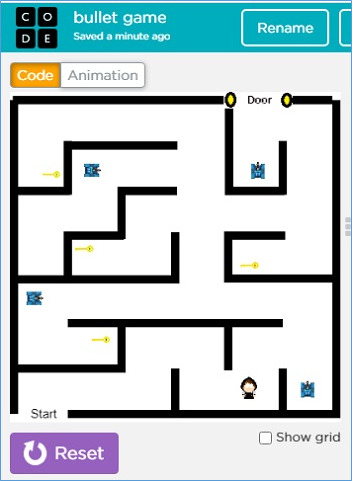
Fig 1: Moving the commando using Up, Down, Left and Right arrow keys.

Fig 2: Game over screen displaying "You Lose!!" message when the player is defeated.
Conclusion
This commando game demonstrates essential JavaScript game development concepts including sprite management, collision detection, user input handling, and game state management. The project showcases how to create an engaging action game with balanced difficulty using Code.org's Game Lab platform.

895 Views
