
Article Categories
- All Categories
-
 Data Structure
-
 Networking
-
 RDBMS
RDBMS
-
 Operating System
-
 Java
Java
-
 MS Excel
-
 iOS
iOS
-
 HTML
HTML
-
 CSS
CSS
-
 Android
-
 Python
-
 C Programming
-
 C++
C++
-
 C#
C#
-
 MongoDB
-
 MySQL
MySQL
-
 Javascript
-
 PHP
PHP
-
 Economics & Finance
Selected Reading
Searching a SAP HANA system in HANA Studio System view
When you are managing a large number of systems using HANA Studio, this can be used to find a specific system more quickly.
To use find system option, the following steps should be performed −
- From the Systems view toolbar, choose the Find System (Find System) button.
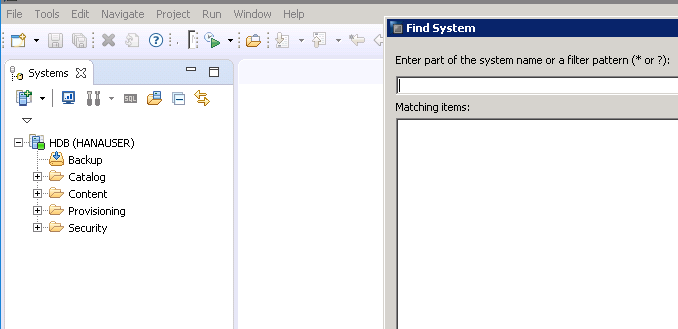
- 2. Enter a search string −
You can also use “*” or “?” wildcards.
It will display matching systems
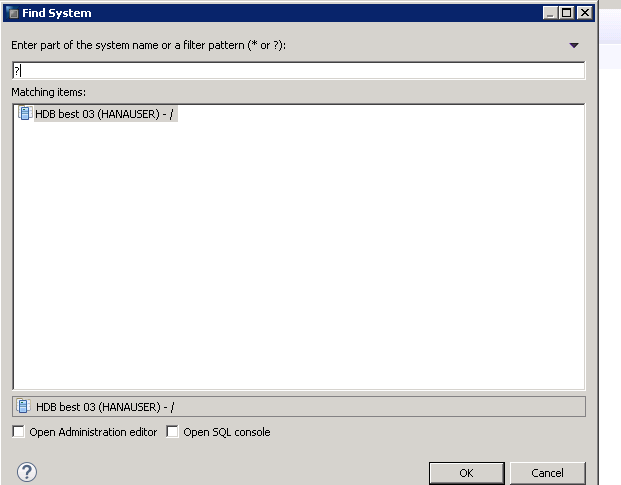
- Select the system you were searching for.
- You can select several systems in the search results by pressing the CTRL key while selecting. You can use this, for example, to mark duplicate systems.
- Choose whether you want to open the selected system in the Administration editor and/or the SQL console.

Updated on: 2020-06-22T09:03:53+05:30
902 Views

Advertisements