
Article Categories
- All Categories
-
 Data Structure
-
 Networking
-
 RDBMS
RDBMS
-
 Operating System
-
 Java
Java
-
 MS Excel
-
 iOS
iOS
-
 HTML
HTML
-
 CSS
CSS
-
 Android
-
 Python
-
 C Programming
-
 C++
C++
-
 C#
C#
-
 MongoDB
-
 MySQL
MySQL
-
 Javascript
-
 PHP
PHP
-
 Economics & Finance
Selected Reading
How to hide and show a column of a row in SAP Detail window
You just need to set the expression which binds to the visibility propert. Go to Data window and select your desired column which you need to show/hide. Then go to properties and look out for the “Visible” checkbox and click on the highlighted button.
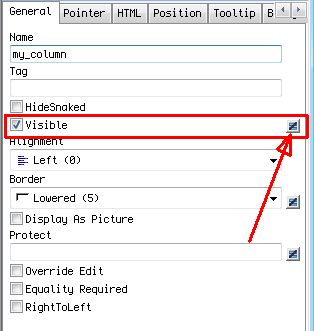
Now write the expression which should drive its visibility. Hope it helps.

Updated on: 2020-02-17T12:37:46+05:30
861 Views

Advertisements