
Article Categories
- All Categories
-
 Data Structure
-
 Networking
-
 RDBMS
RDBMS
-
 Operating System
-
 Java
Java
-
 MS Excel
-
 iOS
iOS
-
 HTML
HTML
-
 CSS
CSS
-
 Android
-
 Python
-
 C Programming
-
 C++
C++
-
 C#
C#
-
 MongoDB
-
 MySQL
MySQL
-
 Javascript
-
 PHP
PHP
-
 Economics & Finance
How to disable JavaScript in Opera?
This tutorial will teach you how to disable JavaScript in the Opera web browser. The latest version used in this tutorial is Version 89.0.4447.71.
About JavaScript
JavaScript is a dynamic programming language that provides control over web application components. When your browser loads a website, it creates the Document Object Model (DOM), and JavaScript can interact with DOM elements to make web applications responsive to user actions.
JavaScript powers animated menus, form validation, instant chat systems, and video player controls. Brendan Eich developed JavaScript in 1995 while working at Netscape on the Navigator browser. Today, JavaScript is a foundational web technology used by millions of developers worldwide.
About Opera
Opera is a multi-platform web browser developed by Opera Software. While built on Chromium, Opera distinguishes itself with unique user interface and features that set it apart from other Chromium-based browsers like Chrome and Edge.
First released on April 10, 1995, Opera is one of the oldest continuously developed desktop browsers. It originally used the proprietary Presto layout engine before switching to Chromium in 2013. Opera supports Windows, macOS, Linux, Android, and iOS platforms.
Steps to Disable JavaScript in Opera
Follow these steps to disable JavaScript in your Opera browser:
Step 1: Launch Opera and click the Settings icon in the sidebar or press Alt+P.

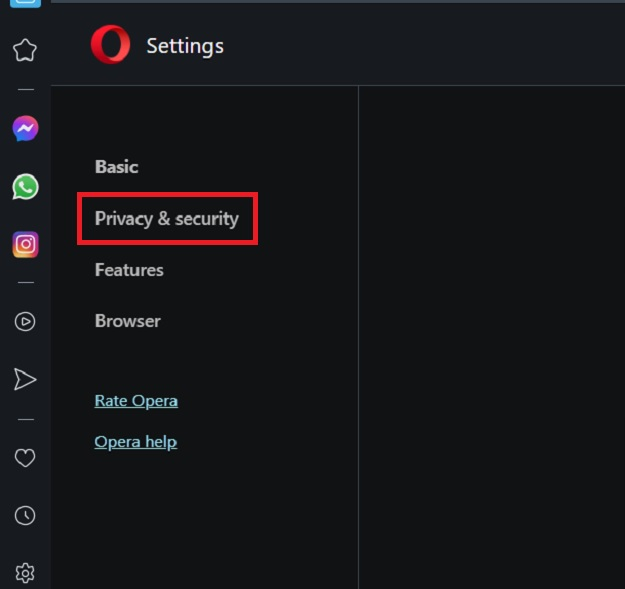
Step 2: In the Settings page, select Privacy & Security from the left menu.
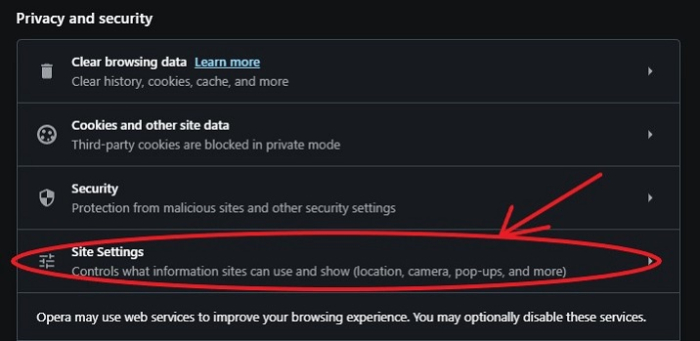
Step 3: Click on Site Settings under the Privacy & Security section.
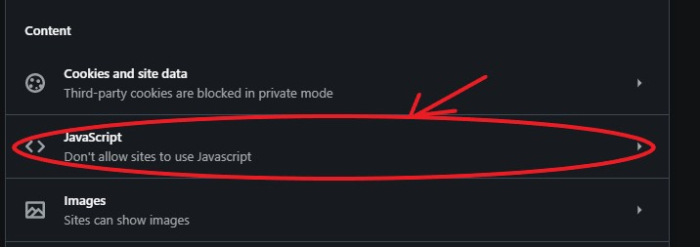
Step 4: Find and select the JavaScript option from the Site Settings list.
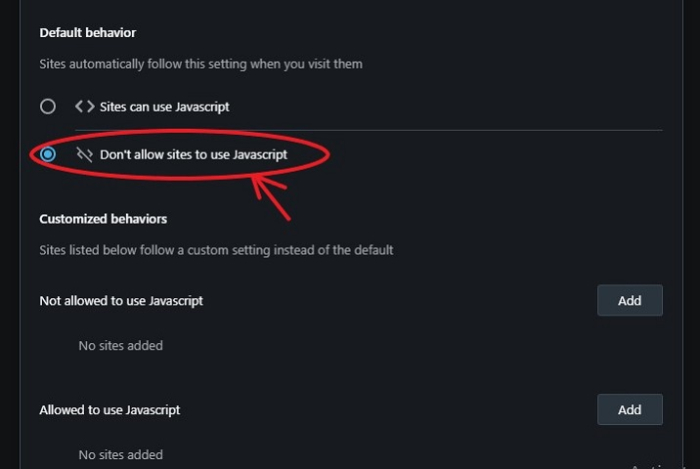
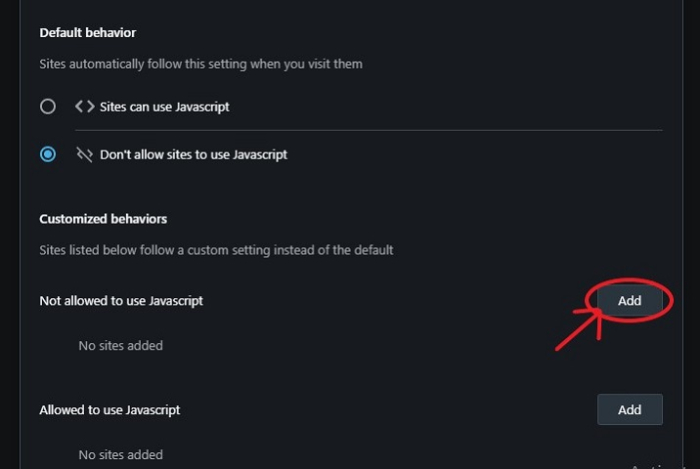
Step 5: Toggle the setting to Don't allow sites to use JavaScript to disable JavaScript globally.
Disabling JavaScript for Specific Sites
To disable JavaScript only for certain websites, use the Not allowed to use JavaScript section:
- Click the Add button in the blocked sites section
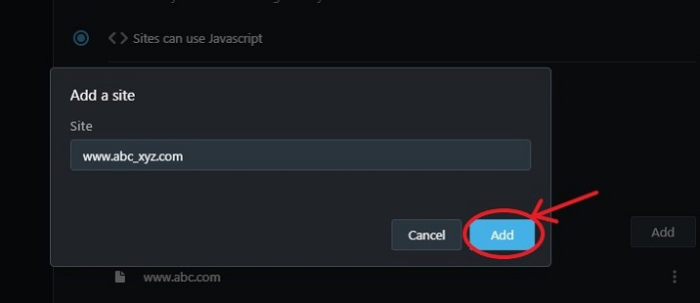
- Enter the URL of the website where you want JavaScript disabled
- Click Add to confirm
Why Disable JavaScript?
Disabling JavaScript can provide several benefits:
Enhanced Security: Prevents malicious scripts from running and protects against JavaScript-based attacks on suspicious websites.
Improved Performance: Pages load faster without JavaScript execution, especially beneficial for older devices or slow internet connections.
Privacy Protection: Blocks tracking scripts and cookies that monitor your browsing behavior, reducing data collection by third parties.
Reduced Data Usage: Saves bandwidth by preventing the download and execution of JavaScript files.
Considerations
Keep in mind that disabling JavaScript may cause some websites to malfunction or display incorrectly, as many modern sites rely heavily on JavaScript for core functionality. You may need to whitelist specific sites that require JavaScript to work properly.
Conclusion
Disabling JavaScript in Opera is straightforward through the browser's privacy settings. Whether for security, performance, or privacy reasons, Opera provides flexible options to disable JavaScript globally or for specific sites.

2K+ Views
