
Article Categories
- All Categories
-
 Data Structure
-
 Networking
-
 RDBMS
RDBMS
-
 Operating System
-
 Java
Java
-
 MS Excel
-
 iOS
iOS
-
 HTML
HTML
-
 CSS
CSS
-
 Android
-
 Python
-
 C Programming
-
 C++
C++
-
 C#
C#
-
 MongoDB
-
 MySQL
MySQL
-
 Javascript
-
 PHP
PHP
-
 Economics & Finance
Selected Reading
Hiding null values in a column in SAP Crystal Reports
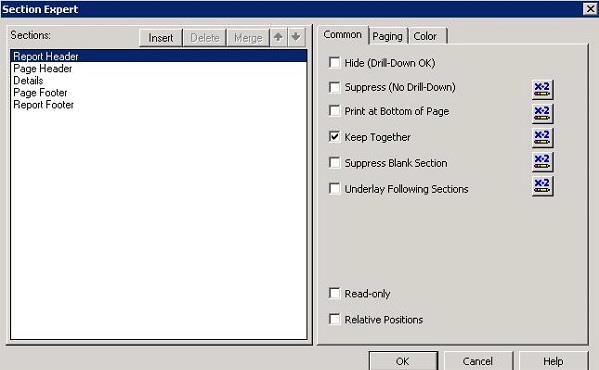
I am not sure where this formula is written. You have to write this formula in suppress part of Section Expert.
To open section expert, right-click Report Header → Section Expert ? click x→2 or suppress
Also, note that you can write the formula in any section where data is present in your report. Try below formula
ToNumber({Choice_.Choice1}) > 0 //You have to ensure choice1 should always a numeric value else report throws exception

Updated on: 2020-03-06T05:21:13+05:30
627 Views

Advertisements