
Article Categories
- All Categories
-
 Data Structure
-
 Networking
-
 RDBMS
RDBMS
-
 Operating System
-
 Java
Java
-
 MS Excel
-
 iOS
iOS
-
 HTML
HTML
-
 CSS
CSS
-
 Android
-
 Python
-
 C Programming
-
 C++
C++
-
 C#
C#
-
 MongoDB
-
 MySQL
MySQL
-
 Javascript
-
 PHP
PHP
-
 Economics & Finance
Edit an ABAP Program using Transaction SE93, SE80
You need to go to SE93 and input your transaction code. It will display the program name behind your transaction code. You can edit the programs using SE80 and SE38 transaction codes.
Using SE93 to Find Program Name
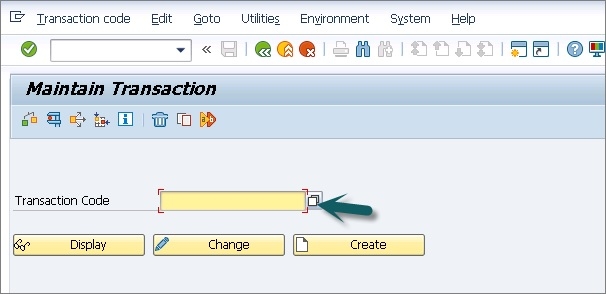
Transaction code SE93 is used to maintain transaction codes and find the associated program names. This is the first step to identify which program you want to edit.
Below shows Transaction code SE93 ?
Editing ABAP Programs
Using SE80 ? ABAP Development Workbench
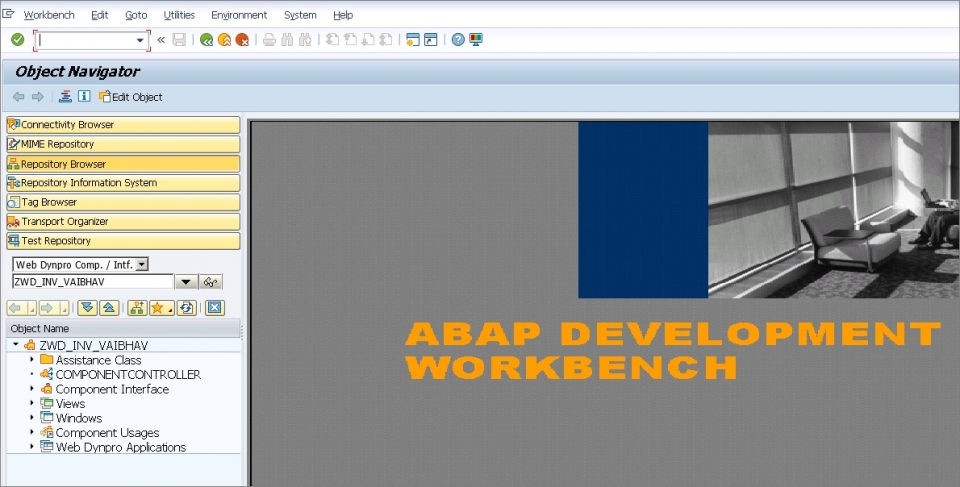
Transaction Code SE80 opens the ABAP Development Workbench, which provides a comprehensive development environment for editing ABAP programs, function modules, and other development objects.
Following shows Transaction Code SE80 to edit an ABAP program by opening ABAP Development workbench ?
Using SE38 ? ABAP Editor
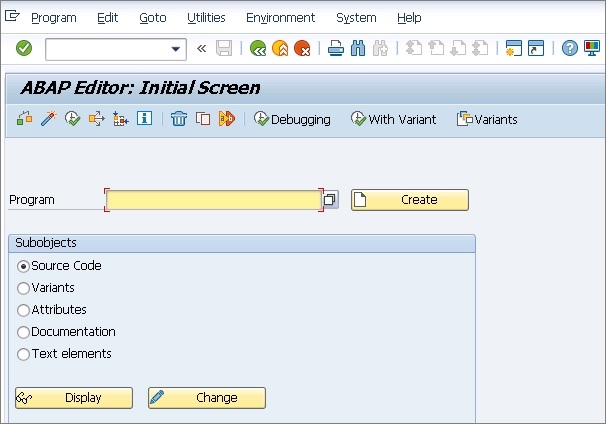
Transaction Code SE38 opens the ABAP Editor Initial screen directly. This is a more direct approach when you already know the program name and want to edit it quickly.
Following shows Transaction Code SE38 to edit an ABAP program by opening ABAP Editor Initial screen and to enter the name of Program ?
Conclusion
Use SE93 to identify program names associated with transaction codes, then use either SE80 for comprehensive development features or SE38 for direct program editing. Both SE80 and SE38 provide effective ways to modify ABAP programs based on your development needs.

1K+ Views
