
Article Categories
- All Categories
-
 Data Structure
-
 Networking
-
 RDBMS
RDBMS
-
 Operating System
-
 Java
Java
-
 MS Excel
-
 iOS
iOS
-
 HTML
HTML
-
 CSS
CSS
-
 Android
-
 Python
-
 C Programming
-
 C++
C++
-
 C#
C#
-
 MongoDB
-
 MySQL
MySQL
-
 Javascript
-
 PHP
PHP
-
 Economics & Finance
Dynamically creating parameters from table entries in SAP system
Note that parameter statement compiles into selection screen at compile time, so it is not possible to declare dynamic parameters as traditionally expected. The parameter definitions must be known at design time.
An alternative approach is to load the dynpro (dynamic program) and change the screen dynamically at runtime. This involves modifying the screen elements programmatically, then activating and running the report that calls the changed screen.
This same approach is used in T-code SE16 to generate a selection screen dynamically from any table structure. The system reads the table's field definitions and creates corresponding input fields on the selection screen.
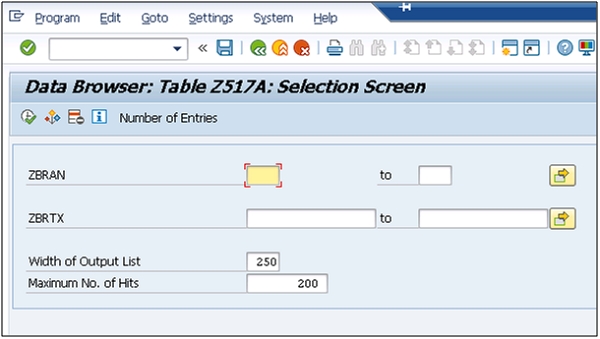
Implementation Steps
To implement dynamic parameter creation, follow these key steps ?
1. Read table structure using DESCRIBE TABLE or field catalog
2. Loop through table fields
3. Create screen elements dynamically using SCREEN table
4. Modify screen attributes in PBO (Process Before Output)
5. Handle user input in PAI (Process After Input)
Example Code Structure
Here's a basic framework for dynamic screen modification ?
REPORT zdynamic_params.

DATA: gt_screen TYPE TABLE OF screen.

AT SELECTION-SCREEN OUTPUT.
  LOOP AT SCREEN.
    " Modify screen elements dynamically
    IF screen-name = 'P_FIELD1'.
      screen-input = 1.
      screen-active = 1.
      MODIFY SCREEN.
    ENDIF.
  ENDLOOP.
Conclusion
While SAP doesn't support truly dynamic parameters at compile time, you can achieve similar functionality by manipulating screen elements dynamically at runtime using dynpro modification techniques.

671 Views
