
Article Categories
- All Categories
-
 Data Structure
-
 Networking
-
 RDBMS
RDBMS
-
 Operating System
-
 Java
Java
-
 MS Excel
-
 iOS
iOS
-
 HTML
HTML
-
 CSS
CSS
-
 Android
-
 Python
-
 C Programming
-
 C++
C++
-
 C#
C#
-
 MongoDB
-
 MySQL
MySQL
-
 Javascript
-
 PHP
PHP
-
 Economics & Finance
Best option for locking bulk user accounts in SAP
As you need to do mass maintenance involving user locking and unlocking, you can opt for using SU10 transaction. This is the most efficient method for bulk user account management in SAP systems.
You can also access this from SAP Menu by navigating to this path ?
Tools ? Administration ? User Maintenance ? User mass maintenance
In SAP system, you have different transactions under User Maintenance that you can use for different purposes.
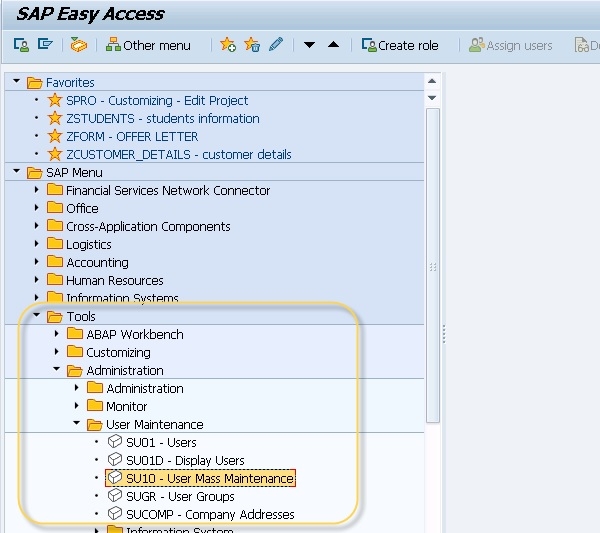
Using T-Code SU10 for User Mass Maintenance
T-Code ? SU10 User Mass Maintenance
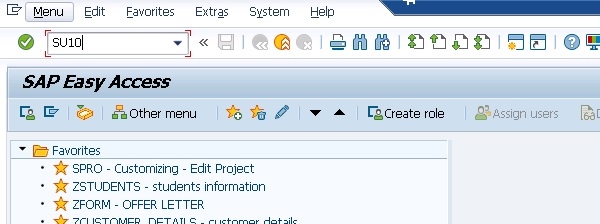
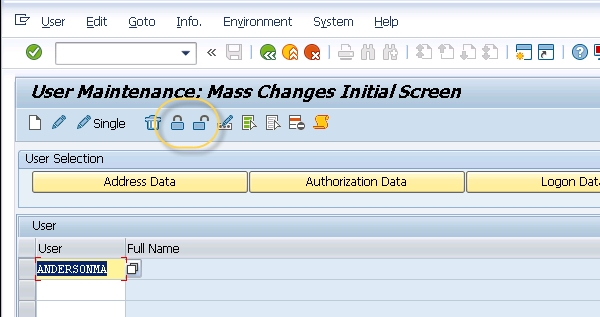
Steps to Lock/Unlock Multiple Users
You can select multiple users at one time and lock/unlock them directly using the following process ?
- Navigate to transaction
SU10 - Enter the user IDs you want to modify or use selection criteria
- Select the users by checking the checkbox next to each user
- Click on the appropriate lock/unlock button to perform the action
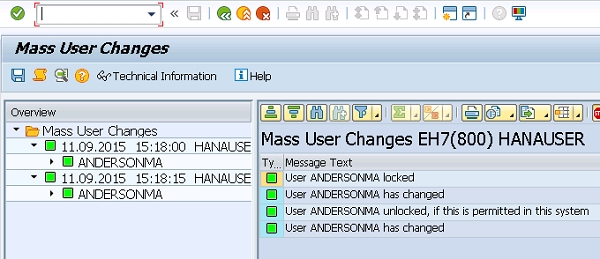
This mass maintenance approach saves significant time when you need to perform the same action on multiple user accounts simultaneously, rather than processing each user individually through transaction SU01.
Conclusion
Transaction SU10 is the best option for locking bulk user accounts in SAP, providing an efficient way to perform mass maintenance operations on multiple users simultaneously.

5K+ Views
