
Article Categories
- All Categories
-
 Data Structure
-
 Networking
-
 RDBMS
RDBMS
-
 Operating System
-
 Java
Java
-
 MS Excel
-
 iOS
iOS
-
 HTML
HTML
-
 CSS
CSS
-
 Android
-
 Python
-
 C Programming
-
 C++
C++
-
 C#
C#
-
 MongoDB
-
 MySQL
MySQL
-
 Javascript
-
 PHP
PHP
-
 Economics & Finance
Adding custom fields to items in SAP Transaction ME5xN x=1,2,3..
This can be done by following the configuration path in SPRO (SAP Project Reference Object) to customize the screen layout for purchase requisition transactions.
Configuration Steps
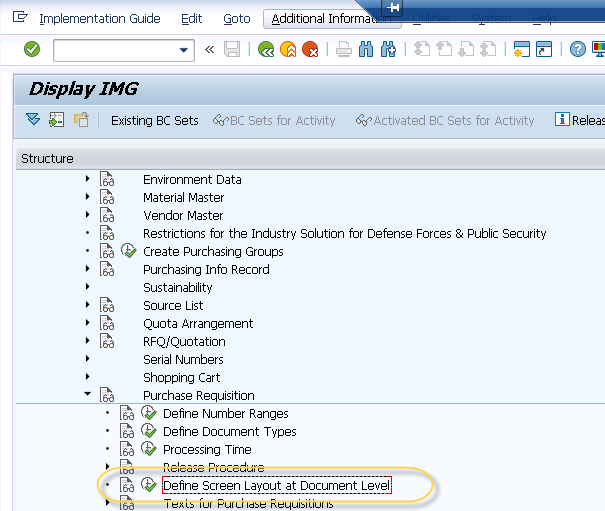
Navigate to the following path to access the screen layout configuration ?
T-code: SPRO ? Materials Management ? Purchasing ? Purchase Requisition ? Define Screen Layout at Document Level
This transaction allows you to view and modify the field properties for the ME5xN transaction screens you want to customize.
Customizing Field Display Properties
When you execute the configuration transaction, you can view the details for the specific transaction you want to customize. To make a custom field visible and editable in the transaction, you need to uncheck the "Display" checkbox for your target field.
This action changes the field from display-only mode to input-enabled mode, allowing users to enter or modify data in the custom field during transaction processing.
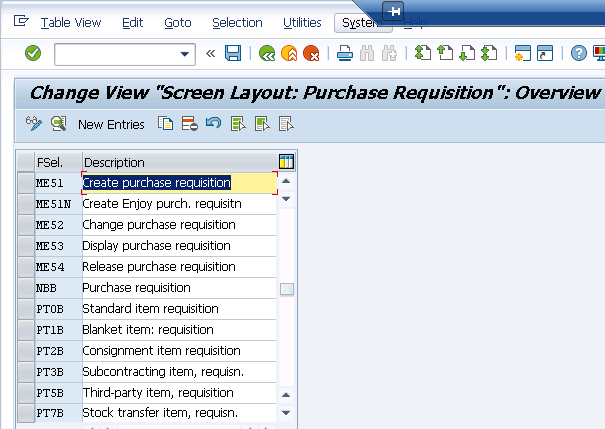
After making these changes, save your configuration. The custom fields will now be available for data entry in the respective ME5xN transactions (ME51N, ME52N, ME53N, etc.).
Conclusion
By configuring the screen layout through SPRO, you can easily enable custom fields in SAP purchase requisition transactions, making them editable for users to input additional data as required by your business processes.

2K+ Views
