
Article Categories
- All Categories
-
 Data Structure
-
 Networking
-
 RDBMS
RDBMS
-
 Operating System
-
 Java
Java
-
 MS Excel
-
 iOS
iOS
-
 HTML
HTML
-
 CSS
CSS
-
 Android
-
 Python
-
 C Programming
-
 C++
C++
-
 C#
C#
-
 MongoDB
-
 MySQL
MySQL
-
 Javascript
-
 PHP
PHP
-
 Economics & Finance
Using SAP T-code SM37 to check background jobs in SAP system
In SM37 you can only see the scheduled background jobs as it is not used for foreground jobs. This transaction code is essential for monitoring and managing batch processes that run behind the scenes in your SAP system.
Accessing SM37 Transaction
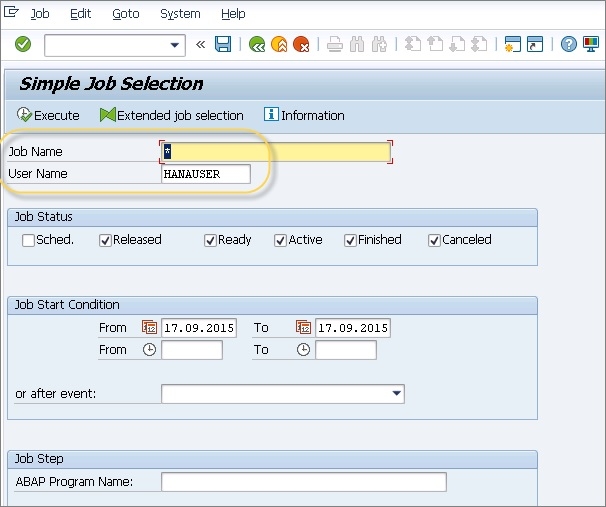
To access the background job monitoring screen, enter SM37 in the SAP command field and press Enter. Below shows the initial screen of SM37 Transaction code ?
Key Features of SM37
The SM37 transaction provides several important functionalities for background job management ?
Job Selection Criteria: You can filter jobs by job name, user name, job status, and date range to find specific background processes quickly.
Job Status Monitoring: View different job statuses including Scheduled, Released, Ready, Active, Finished, and Cancelled to understand the current state of your background processes.
Job Details: Access detailed information about each job including start time, end time, job logs, and any error messages that occurred during execution.
Common Job Statuses
Understanding job statuses is crucial for effective monitoring ?
Scheduled - Job is planned but not yet released
Released  - Job is released and waiting for execution
Ready     - Job is ready to run and waiting for available work process
Active    - Job is currently running
Finished  - Job completed successfully
Cancelled - Job was terminated or failed during execution
Conclusion
SM37 is an indispensable tool for SAP system administrators to monitor and manage background jobs effectively. Regular monitoring through SM37 helps ensure smooth system operations and quick identification of any processing issues.

1K+ Views
