
- Ruby Basics
- Ruby - Home
- Ruby - Overview
- Ruby - Environment Setup
- Ruby - Syntax
- Ruby - Classes and Objects
- Ruby - Variables
- Ruby - Operators
- Ruby - Comments
- Ruby - IF...ELSE
- Ruby - Loops
- Ruby - Methods
- Ruby - Blocks
- Ruby - Modules
- Ruby - Strings
- Ruby - Arrays
- Ruby - Hashes
- Ruby - Date & Time
- Ruby - Ranges
- Ruby - Iterators
- Ruby - File I/O
- Ruby - Exceptions
- Ruby Advanced
- Ruby - Object Oriented
- Ruby - Regular Expressions
- Ruby - Database Access
- Ruby - Web Applications
- Ruby - Sending Email
- Ruby - Socket Programming
- Ruby - Ruby/XML, XSLT
- Ruby - Web Services
- Ruby - Tk Guide
- Ruby - Ruby/LDAP Tutorial
- Ruby - Multithreading
- Ruby - Built-in Functions
- Ruby - Predefined Variables
- Ruby - Predefined Constants
- Ruby - Associated Tools
- Ruby Useful Resources
- Ruby - Quick Guide
- Ruby - Useful Resources
- Ruby - Discussion
- Ruby - Ruby on Rails Tutorial
Ruby/TK - Message Box Widget
Standard Options
NA
Widget Specific Options
| Sr.No. | Options & Description |
|---|---|
| 1 | icon => String Specify the icon of the messageBox. Valid values are error, info, question, or warning. |
| 2 | type => String Specify the type of the messageBox. Valid values are abortretryignore, ok, okcancel, retrycancel, yesno, or yesnocancel. The type determines the buttons to be shown. |
| 3 | default => String Specify the default button. This must be one of abort, retry, ignore, ok, cancel, yes, or no, depending on the type of the messageBox previously specified. |
| 4 | detail => String Specify text for the detail region of the messageBox. |
| 5 | message => String Specify the message text of the messageBox. |
| 6 | title => String Specify the title of the messageBox. |
Event Bindings
NA
Examples
require 'tk'

root = TkRoot.new
root.title = "Window"

msgBox = Tk.messageBox (
   'type'    => "ok",
   'icon'    => "info",
   'title'   => "This is title",
   'message' => "This is message"
)
Tk.mainloop
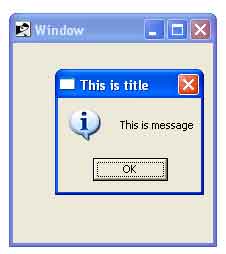
This will produce the following result −
ruby_tk_guide.htm
Advertisements