- Python Basics
- Python - Home
- Python - Overview
- Python - History
- Python - Features
- Python vs C++
- Python - Hello World Program
- Python - Application Areas
- Python - Interpreter
- Python - Environment Setup
- Python - Virtual Environment
- Python - Basic Syntax
- Python - Variables
- Python - Data Types
- Python - Type Casting
- Python - Unicode System
- Python - Literals
- Python - Operators
- Python - Arithmetic Operators
- Python - Comparison Operators
- Python - Assignment Operators
- Python - Logical Operators
- Python - Bitwise Operators
- Python - Membership Operators
- Python - Identity Operators
- Python - Operator Precedence
- Python - Comments
- Python - User Input
- Python - Numbers
- Python - Booleans
- Python Control Statements
- Python - Control Flow
- Python - Decision Making
- Python - If Statement
- Python - If else
- Python - Nested If
- Python - Match-Case Statement
- Python - Loops
- Python - for Loops
- Python - for-else Loops
- Python - While Loops
- Python - break Statement
- Python - continue Statement
- Python - pass Statement
- Python - Nested Loops
- Python Functions & Modules
- Python - Functions
- Python - Default Arguments
- Python - Keyword Arguments
- Python - Keyword-Only Arguments
- Python - Positional Arguments
- Python - Positional-Only Arguments
- Python - Arbitrary Arguments
- Python - Variables Scope
- Python - Function Annotations
- Python - Modules
- Python - Built in Functions
- Python Strings
- Python - Strings
- Python - Slicing Strings
- Python - Modify Strings
- Python - String Concatenation
- Python - String Formatting
- Python - Escape Characters
- Python - String Methods
- Python - String Exercises
- Python Lists
- Python - Lists
- Python - Access List Items
- Python - Change List Items
- Python - Add List Items
- Python - Remove List Items
- Python - Loop Lists
- Python - List Comprehension
- Python - Sort Lists
- Python - Copy Lists
- Python - Join Lists
- Python - List Methods
- Python - List Exercises
- Python Tuples
- Python - Tuples
- Python - Access Tuple Items
- Python - Update Tuples
- Python - Unpack Tuples
- Python - Loop Tuples
- Python - Join Tuples
- Python - Tuple Methods
- Python - Tuple Exercises
- Python Sets
- Python - Sets
- Python - Access Set Items
- Python - Add Set Items
- Python - Remove Set Items
- Python - Loop Sets
- Python - Join Sets
- Python - Copy Sets
- Python - Set Operators
- Python - Set Methods
- Python - Set Exercises
- Python Dictionaries
- Python - Dictionaries
- Python - Access Dictionary Items
- Python - Change Dictionary Items
- Python - Add Dictionary Items
- Python - Remove Dictionary Items
- Python - Dictionary View Objects
- Python - Loop Dictionaries
- Python - Copy Dictionaries
- Python - Nested Dictionaries
- Python - Dictionary Methods
- Python - Dictionary Exercises
- Python Arrays
- Python - Arrays
- Python - Access Array Items
- Python - Add Array Items
- Python - Remove Array Items
- Python - Loop Arrays
- Python - Copy Arrays
- Python - Reverse Arrays
- Python - Sort Arrays
- Python - Join Arrays
- Python - Array Methods
- Python - Array Exercises
- Python File Handling
- Python - File Handling
- Python - Write to File
- Python - Read Files
- Python - Renaming and Deleting Files
- Python - Directories
- Python - File Methods
- Python - OS File/Directory Methods
- Object Oriented Programming
- Python - OOPs Concepts
- Python - Object & Classes
- Python - Class Attributes
- Python - Class Methods
- Python - Static Methods
- Python - Constructors
- Python - Access Modifiers
- Python - Inheritance
- Python - Polymorphism
- Python - Method Overriding
- Python - Method Overloading
- Python - Dynamic Binding
- Python - Dynamic Typing
- Python - Abstraction
- Python - Encapsulation
- Python - Interfaces
- Python - Packages
- Python - Inner Classes
- Python - Anonymous Class and Objects
- Python - Singleton Class
- Python - Wrapper Classes
- Python - Enums
- Python - Reflection
- Python Errors & Exceptions
- Python - Syntax Errors
- Python - Exceptions
- Python - try-except Block
- Python - try-finally Block
- Python - Raising Exceptions
- Python - Exception Chaining
- Python - Nested try Block
- Python - User-defined Exception
- Python - Logging
- Python - Assertions
- Python - Built-in Exceptions
- Python Multithreading
- Python - Multithreading
- Python - Thread Life Cycle
- Python - Creating a Thread
- Python - Starting a Thread
- Python - Joining Threads
- Python - Naming Thread
- Python - Thread Scheduling
- Python - Thread Pools
- Python - Main Thread
- Python - Thread Priority
- Python - Daemon Threads
- Python - Synchronizing Threads
- Python Synchronization
- Python - Inter-thread Communication
- Python - Thread Deadlock
- Python - Interrupting a Thread
- Python Networking
- Python - Networking
- Python - Socket Programming
- Python - URL Processing
- Python - Generics
- Python Libraries
- NumPy Tutorial
- Pandas Tutorial
- SciPy Tutorial
- Matplotlib Tutorial
- Django Tutorial
- OpenCV Tutorial
- Python Miscellenous
- Python - Date & Time
- Python - Maths
- Python - Iterators
- Python - Generators
- Python - Closures
- Python - Decorators
- Python - Recursion
- Python - Reg Expressions
- Python - PIP
- Python - Database Access
- Python - Weak References
- Python - Serialization
- Python - Templating
- Python - Output Formatting
- Python - Performance Measurement
- Python - Data Compression
- Python - CGI Programming
- Python - XML Processing
- Python - GUI Programming
- Python - Command-Line Arguments
- Python - Docstrings
- Python - JSON
- Python - Sending Email
- Python - Further Extensions
- Python - Tools/Utilities
- Python - GUIs
- Python Useful Resources
- Python Compiler
- NumPy Compiler
- Matplotlib Compiler
- SciPy Compiler
- Python - Programming Examples
- Python - Quick Guide
- Python - Useful Resources
- Python - Discussion
Tkinter Button
The Button widget is used to add buttons in a Python application. These buttons can display text or images that convey the purpose of the buttons. You can attach a function or a method to a button which is called automatically when you click the button.
Syntax
Here is the simple syntax to create this widget −
w = Button ( master, option=value, ... )
Parameters
master − This represents the parent window.
options − Here is the list of most commonly used options for this widget. These options can be used as key-value pairs separated by commas.
| Sr.No. | Option & Description |
|---|---|
| 1 | Activebackground activebackground Background color when the button is under the cursor. |
| 2 | Activeforeground Foreground color when the button is under the cursor. |
| 3 | Bd Border width in pixels. Default is 2. |
| 4 | Bg Normal background color. |
| 5 | Command Function or method to be called when the button is clicked. |
| 6 | Fg Normal foreground (text) color. |
| 7 | Font Text font to be used for the button's label. |
| 8 | Height Height of the button in text lines (for textual buttons) or pixels (for images). |
| 9 | Highlightcolor The color of the focus highlight when the widget has focus. |
| 10 | Image Image to be displayed on the button (instead of text). |
| 11 | Justify How to show multiple text lines: LEFT to left-justify each line; CENTER to center them; or RIGHT to right-justify. |
| 12 | Padx Additional padding left and right of the text. |
| 13 | Pady Additional padding above and below the text. |
| 14 | Relief Relief specifies the type of the border. Some of the values are SUNKEN, RAISED, GROOVE, and RIDGE. |
| 15 | State Set this option to DISABLED to gray out the button and make it unresponsive. Has the value ACTIVE when the mouse is over it. Default is NORMAL. |
| 16 | Underline Default is -1, meaning that no character of the text on the button will be underlined. If nonnegative, the corresponding text character will be underlined. |
| 17 | Width Width of the button in letters (if displaying text) or pixels (if displaying an image). |
| 18 | Wraplength If this value is set to a positive number, the text lines will be wrapped to fit within this length. |
Methods
Following are commonly used methods for this widget −
| Sr.No. | Method & Description |
|---|---|
| 1 | flash() Causes the button to flash several times between active and normal colors. Leaves the button in the state it was in originally. Ignored if the button is disabled. |
| 2 | invoke() Calls the button's callback, and returns what that function returns. Has no effect if the button is disabled or there is no callback. |
Example
Try the following example yourself −
from tkinter import *
from tkinter import messagebox
top = Tk()
top.geometry("100x100")
def helloCallBack():
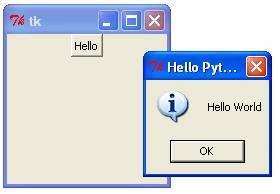
   msg=messagebox.showinfo( "Hello Python", "Hello World")
B = Button(top, text ="Hello", command = helloCallBack)
B.place(x=50,y=50)
top.mainloop()
When the above code is executed, it produces the following result −