
- PL/SQL Tutorial
- PL/SQL - Home
- PL/SQL - Overview
- PL/SQL - Environment
- PL/SQL - Basic Syntax
- PL/SQL - Data Types
- PL/SQL - Variables
- PL/SQL - Constants and Literals
- PL/SQL - Operators
- PL/SQL - Conditions
- PL/SQL - Loops
- PL/SQL - Strings
- PL/SQL - Arrays
- PL/SQL - Procedures
- PL/SQL - Functions
- PL/SQL - Cursors
- PL/SQL - Records
- PL/SQL - Exceptions
- PL/SQL - Triggers
- PL/SQL - Packages
- PL/SQL - Collections
- PL/SQL - Transactions
- PL/SQL - Date & Time
- PL/SQL - DBMS Output
- PL/SQL - Object Oriented
- PL/SQL Useful Resources
- PL/SQL - Questions and Answers
- PL/SQL - Quick Guide
- PL/SQL - Useful Resources
- PL/SQL - Discussion
PL/SQL - GOTO Statement
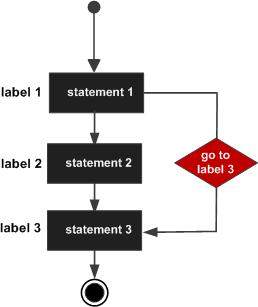
A GOTO statement in PL/SQL programming language provides an unconditional jump from the GOTO to a labeled statement in the same subprogram.
NOTE − The use of GOTO statement is not recommended in any programming language because it makes it difficult to trace the control flow of a program, making the program hard to understand and hard to modify. Any program that uses a GOTO can be rewritten so that it doesn't need the GOTO.
Syntax
The syntax for a GOTO statement in PL/SQL is as follows −
GOTO label;
..
..
<< label >>
statement;
Flow Diagram
Example
DECLARE
   a number(2) := 10;
BEGIN
   <<loopstart>>
   -- while loop execution
   WHILE a < 20 LOOP
   dbms_output.put_line ('value of a: ' || a);
      a := a + 1;
      IF a = 15 THEN
         a := a + 1;
         GOTO loopstart;
      END IF;
   END LOOP;
END;
/
When the above code is executed at the SQL prompt, it produces the following result −
value of a: 10
value of a: 11
value of a: 12
value of a: 13
value of a: 14
value of a: 16
value of a: 17
value of a: 18
value of a: 19

PL/SQL procedure successfully completed.
Restrictions with GOTO Statement
GOTO Statement in PL/SQL imposes the following restrictions −
A GOTO statement cannot branch into an IF statement, CASE statement, LOOP statement or sub-block.
A GOTO statement cannot branch from one IF statement clause to another or from one CASE statement WHEN clause to another.
A GOTO statement cannot branch from an outer block into a sub-block (i.e., an inner BEGIN-END block).
A GOTO statement cannot branch out of a subprogram. To end a subprogram early, either use the RETURN statement or have GOTO branch to a place right before the end of the subprogram.
A GOTO statement cannot branch from an exception handler back into the current BEGIN-END block. However, a GOTO statement can branch from an exception handler into an enclosing block.