
- Pascal Tutorial
- Pascal - Home
- Pascal - Overview
- Pascal - Environment Setup
- Pascal - Program Structure
- Pascal - Basic Syntax
- Pascal - Data Types
- Pascal - Variable Types
- Pascal - Constants
- Pascal - Operators
- Pascal - Decision Making
- Pascal - Loops
- Pascal - Functions
- Pascal - Procedures
- Pascal - Variable Scope
- Pascal - Strings
- Pascal - Booleans
- Pascal - Arrays
- Pascal - Pointers
- Pascal - Records
- Pascal - Variants
- Pascal - Sets
- Pascal - File Handling
- Pascal - Memory
- Pascal - Units
- Pascal - Date & Time
- Pascal - Objects
- Pascal - Classes
- Pascal Useful Resources
- Pascal - Quick Guide
- Pascal - Useful Resources
- Pascal - Discussion
Pascal - goto Statement
A goto statement in Pascal provides an unconditional jump from the goto to a labeled statement in the same function.
NOTE − Use of goto statement is highly discouraged in any programming language because it makes difficult to trace the control flow of a program, making the program hard to understand and hard to modify. Any program that uses a goto can be rewritten so that it doesn't need the goto.
Syntax
The syntax for a goto statement in Pascal is as follows −
goto label;
   ...
   ...
label: statement;
Here, label must be an unsigned integer label, whose value can be from 1 to 9999.
Flow Diagram
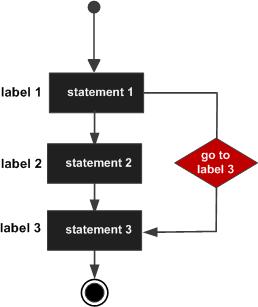
Example
The following program illustrates the concept.
program exGoto;
label 1;
var
   a : integer;

begin
   a := 10;
   (* repeat until loop execution *)
   1: repeat
      if( a = 15) then

      begin
         (* skip the iteration *)
         a := a + 1;
         goto 1;
      end;

      writeln('value of a: ', a);
      a:= a +1;
   until a = 20;
end.
When the above code is compiled and executed, it produces the following result −
value of a: 10
value of a: 11
value of a: 12
value of a: 13
value of a: 14
value of a: 16
value of a: 17
value of a: 18
value of a: 19
Please note that −
In Pascal, all labels must be declared before constant and variable declarations.
The if and goto statements may be used in the compound statement to transfer control out of the compound statement, but it is illegal to transfer control into a compound statement.